
A slow CRM can cost real estate agents deals. Here’s why: 78% of homebuyers work with the first agent who responds, yet most agents take over 15 hours to reply. Poorly designed CRMs with clunky interfaces and manual data entry slow agents down, leading to missed opportunities and abandoned systems. In fact, 30%–70% of CRM deployments fail due to low user adoption – not technical problems.
The solution? CRMs designed for real estate workflows. Systems with features like property-centric data models, mobile-first designs, and automation improve response times, reduce manual tasks, and increase productivity by up to 35%. While custom CRMs require upfront investment (around $60,000–$200,000), they deliver a high return: $8.71 for every $1 spent and 30% more deals closed per quarter.
Key Takeaways:
- Poor UX leads to slow responses, incomplete data, and abandoned CRMs.
- Custom CRMs tailored for real estate save time, boost productivity, and close more deals.
- Teams using well-designed systems see faster ROI and higher adoption rates.
A CRM isn’t just a tool – it’s a revenue driver when designed with UX in mind.
Top 4 questions about UX/UI design for real estate
sbb-itb-8058745
UX Priorities and Pain Points in Real Estate CRMs
Good CRM design isn’t about cramming in more features – it’s about making workflows smoother. The success of a CRM system often comes down to the design decisions made early on.
The best systems stick to the Three-Click Rule: any routine action – whether it’s logging a call, updating a deal stage, or sending a follow-up – should take no more than three clicks. Add to that a mobile-first design that enables quick, one-handed use in under 30 seconds, which aligns with 68% of agent tasks being conducted in the field. Customizable, role-based dashboards also play a major role by tailoring views. Agents get urgency-ranked task lists, while brokers see portfolio-level insights – replacing the ineffective, one-size-fits-all approach.
While innovative features can attract users, poor design can just as easily derail productivity. A staggering 76% of CRM users cite complexity and clunky interfaces as their biggest frustrations. On top of that, the average agent spends 4.5 hours each week on manual data entry. Fragmented information spread across WhatsApp, email, and MLS tabs prevents agents from having a clear view of leads, making personalized service nearly impossible. Utilizing a precision property search tool can help consolidate these data points into a single source of truth. Vikas Patel of gtcsys.com highlights this issue perfectly:
"The most revealing question you can ask a brokerage about their current CRM is not ‘what does it do?’ but ‘what do your agents actually use it for?’"
Here’s a breakdown of the key design principles that drive CRM adoption versus the common pitfalls that undermine it:
| UX Priority | UX Pitfall |
|---|---|
| Simplicity (Three-Click Rule): Common tasks completed in ≤3 clicks | Cluttered Interfaces: Designed for flashy demos, not daily use |
| Mobile-First Design: Quick, one-handed field use in 30 seconds | Desktop Dependency: Browser-only features are often ignored |
| Role-Based Dashboards: Custom views for agents (tasks/leads) and brokers (portfolio metrics) | One-Size-Fits-All: Generic interfaces lead to abandoned data |
| Drawer Flow: Maintain position when viewing details | Navigational Friction: Forcing users to leave lists adds cognitive load |
| Automated Data Ingestion: Leads flow directly from portals | Manual Data Entry: High input demands result in untrusted, incomplete data |
When these pitfalls pile up, agents often skip fields out of frustration, leading to incomplete data that managers can’t trust. This creates a vicious cycle where the system sees less and less use. It’s no wonder that 83% of senior executives say their biggest technology challenge is getting staff to actually use CRM software. It’s clear that early design choices in UX don’t just affect usability – they can have a direct impact on revenue.
1. UX-Focused Custom Real Estate CRMs
Creating a CRM specifically designed for real estate workflows can lead to impressive results. Teams using customized, user-friendly systems report closing 28% more deals and experience a 35% boost in agent productivity compared to those relying on generic tools. Why? Because these systems are tailored to real estate’s unique, non-linear sales cycles rather than forcing agents into a rigid "lead to close" structure.
One major shift in custom CRMs is moving from a contact-centric to a property-centric data model. While standard CRMs prioritize people as the main data point, real estate-focused systems put properties at the center. This approach tracks critical details like showing history, escrow progress, and marketing efforts. By focusing on property data, teams can streamline operations and improve efficiency.
Speed is another area where these systems shine. In real estate, timing is everything – 78% of homebuyers work with the first agent who responds. Custom CRMs cut response times dramatically, from an average of 5 hours to just 5 minutes, thanks to automated lead routing that assigns inquiries instantly. As Liubomyr Pohreliuk, CEO of Inoxoft, explains:
"Speed wins deals, and speed at scale requires a system built for how real estate actually works."
The benefits extend beyond quicker responses. Custom CRMs reduce application processing time from 45 minutes to 15 and cut the time spent searching for property or client information from 30 minutes to just 5. This efficiency is often powered by a real estate API that centralizes disparate data sources. These efficiency gains translate into happier clients, with satisfaction scores jumping from 75% to 92% after teams adopt purpose-built systems. On top of that, closed deals increase by 30% per quarter.
Of course, building a custom CRM requires an upfront investment. Costs range from $60,000 to $120,000 for mid-level systems, with enterprise-level builds exceeding $200,000. Annual maintenance typically runs 15–20% of the initial cost. However, the numbers speak for themselves: teams see an average return of $8.71 for every $1 spent, making these systems a smart choice for real estate teams looking to grow.
2. Poorly Designed Real Estate CRMs
While some CRMs are tailored for real estate workflows, poorly designed systems often miss the mark by sticking to outdated sales models. Here’s the reality: only 30% of real estate agents consistently use a CRM, and 39% still rely on spreadsheets to manage client relationships. The problem isn’t the lack of tailored real estate data solutions available – it’s that many CRMs are built for linear B2B sales cycles, which don’t match the lengthy and complex 4–9 month process of real estate transactions. This process includes site visits, escrow stages, and plenty of document collection, none of which fit neatly into a rigid system.
Data entry is where the frustration begins. Imagine being required to fill out 14 or more fields just to save a single contact. For many agents, this is a deal-breaker, leading to what experts call the "adoption death spiral." As one study highlights:
"The spreadsheet never asks you to fill in 14 required fields before saving a contact." – Pinova Adoption Study
When agents skip these fields to save time, the quality of the data plummets. Leadership loses trust in the reports, and agents become even less motivated to use the system. It’s a vicious cycle that undermines the entire operation. Take, for example, Marcus Webb, a solo agent based in Phoenix. In Q1 2025, he spent $2,400 on Zillow leads but tracked them manually using Google Sheets. His average response time ballooned to 19 hours, and he closed only one deal. Why? Buyers had already moved on to agents who responded within minutes. Research shows that leads contacted within 5 minutes are 21 times more likely to qualify than those reached after 30 minutes.
But the issues don’t stop there. Many CRMs rely on static desktop designs, which further slow down response times. Without mobile-friendly options, agents can’t log data in real time, leading to fragmented communication and missed opportunities. Integrating real-time property insights into these workflows can help bridge the gap between field work and data management. Vikas Patel of GTC Systems sums it up perfectly:
"The gap between what brokerage CRMs offer and what agents genuinely adopt is not a training problem… It’s a design problem."
The impact on business is huge. Between 30% and 70% of CRM deployments fail – not because of technical glitches, but due to poor user adoption. Forced data entry and reliance on desktop systems directly translate to lost revenue. For an agent closing deals at a 1.5% rate, even minor delays in response time can result in $30,000–$45,000 in lost annual commissions. And it’s not just about wasting the CRM’s licensing fee – it’s about the revenue slipping through the cracks.
"A CRM that nobody uses is not a technology problem. It is a revenue leak." – Metadata Technologies
Pros and Cons
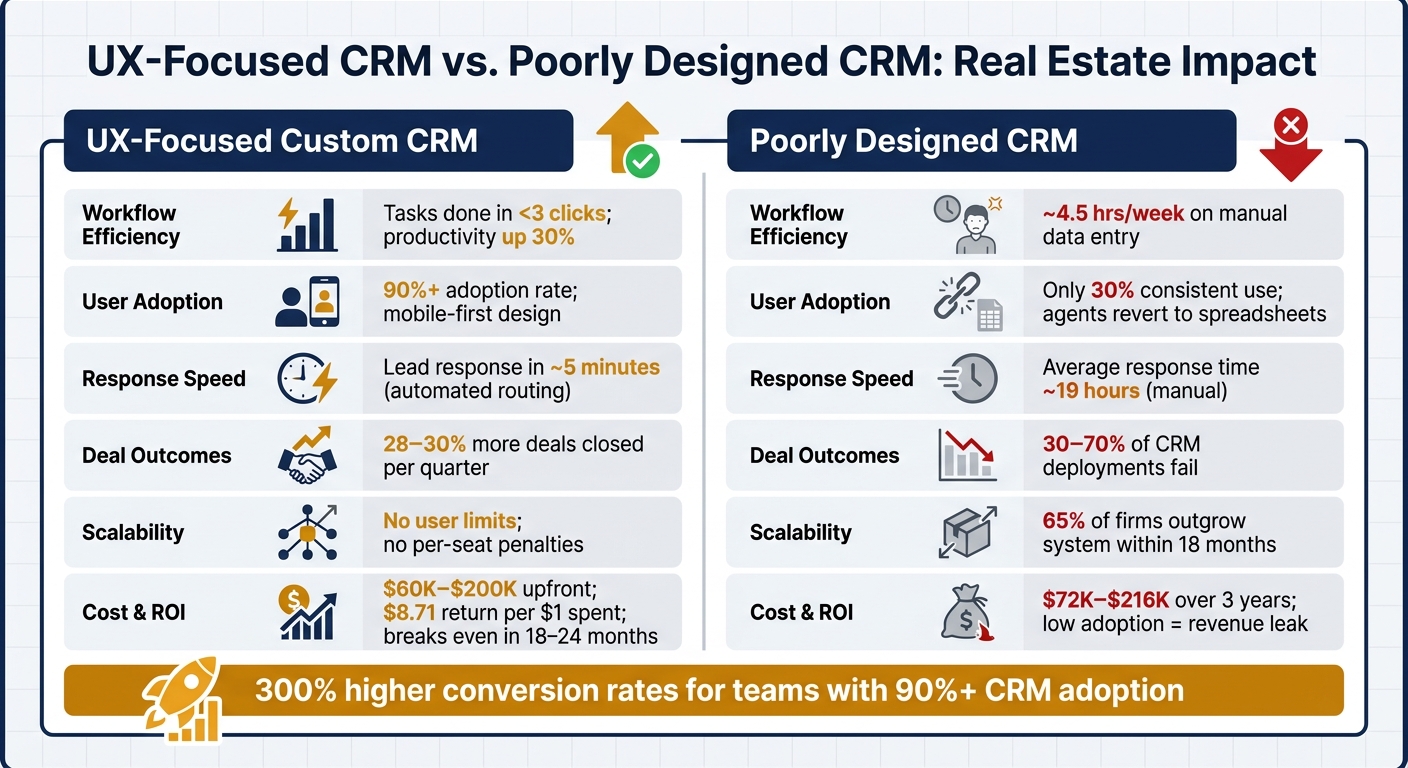
UX-Focused CRM vs. Poorly Designed CRM: Real Estate Impact
Expanding on the UX differences discussed earlier, it’s clear that design choices in CRM systems have a direct impact on revenue. The divide between well-built and poorly designed CRMs can significantly influence outcomes. Systems with a strong focus on user experience (UX) tend to improve deal closures and productivity, whereas poorly designed systems often lead to deployment failures.
Here’s a quick comparison of the key factors that affect user adoption and revenue outcomes in UX-focused custom CRMs versus poorly designed ones:
| Factor | UX-Focused Custom CRM | Poorly Designed CRM |
|---|---|---|
| Workflow Efficiency | Routine tasks completed in under three clicks; automation boosts productivity by up to 30% | High manual data entry (~4.5 hours/week); agents resort to inefficient workarounds |
| Data Handling | Centralized data with native MLS/IDX sync; full data ownership | Disorganized records; many agent interactions go unlogged due to clunky interfaces |
| User Adoption | Over 90% adoption; mobile-first design tailored for field use | Around 30% consistent use; complexity often drives agents back to spreadsheets |
| Response Speed | Fast, automated routing | Delayed manual responses |
| Scalability | No user limits; avoids per-seat cost penalties | 65% of firms outgrow these systems within 18 months |
| Cost Structure | High initial cost ($25,000–$200,000+); pays for itself within 18–24 months | Lower initial cost; $2,000–$6,000 per month for 40 users ($72,000–$216,000 over three years) |
These contrasts highlight why a custom-built CRM is often essential for improving operational efficiency and driving revenue. It all circles back to UX being a central factor in real estate success.
Now, let’s talk numbers. For a 25-agent firm paying $120 per user each month, the annual cost of a standard CRM is $36,000 – and that’s for a tool the firm doesn’t own or fully control. On the flip side, while custom CRMs require a higher upfront investment, they typically break even within two years thanks to savings on licensing fees and reduced administrative overhead.
Adoption rates tell a similar story. Fewer than 40% of CRM users achieve a 90%+ adoption rate. However, teams that do reach this level enjoy 300% higher conversion rates compared to those with lower adoption. As Liubomyr Pohreliuk, CEO of Inoxoft, puts it:
"Most CRM implementations fail due to poor user adoption. Designing for how agents actually work matters more than how many features the system has."
Conclusion
UX is more than just a design choice – it’s a crucial business strategy. Real estate teams that embrace UX-focused custom CRMs report closing up to 30% more deals per quarter, often recouping their investment in just 18–24 months. On the flip side, teams stuck with outdated, clunky systems face low adoption rates, incomplete property data, and tools that agents quietly abandon.
In real estate, where most homebuyers go with the first agent who responds, speed isn’t just helpful – it’s essential. Every second saved can directly impact revenue. A CRM that instantly flags urgent leads, logs calls with minimal effort, and functions effortlessly on mobile devices isn’t a luxury – it’s what separates top-performing teams from the rest.
These tools don’t just streamline workflows – they drive profits. For every $1 spent on a CRM, businesses see an average return of $8.71. Custom CRMs, in particular, eliminate per-seat fees and give teams full control over their data and processes.
As Metadata Technologies aptly states:
"A CRM that nobody uses is not a technology problem. It is a revenue leak."
If your team is bypassing the CRM, it’s a clear signal that it’s time for an upgrade. The analysis here makes it clear: adopting a UX-focused CRM leads to higher usage, quicker responses, and better conversion rates. It’s one of the smartest moves a real estate team can make.
FAQs
How do I know if our CRM UX is losing us deals?
Here are some red flags that your CRM’s user experience could be holding your team back:
- Agents bypassing the CRM: If team members are opting for spreadsheets or relying on memory, it’s a sign the system feels more like a burden than a tool.
- Clunky data entry: Confusing or time-consuming input processes often lead to skipped updates, leaving your data incomplete.
- No automated alerts: Missing notifications for high-priority leads means opportunities could be slipping through the cracks.
- Too many clicks: When simple tasks or finding information require excessive steps, productivity takes a hit.
- Unclear dashboards: Dashboards that don’t offer clear, actionable insights make it harder for your team to focus on the right leads.
Fixing these pain points can turn your CRM into a true asset for your team, streamlining their workflow and helping them close more deals.
What real estate workflows should a custom CRM support first?
A custom real estate CRM should prioritize managing leads effectively and improving day-to-day operations. Begin by implementing features like automated lead capture, smart lead scoring, and routing leads to agents based on their availability or expertise. Next, integrate the CRM with MLS (Multiple Listing Service) to provide up-to-date property data. Lastly, incorporate transaction management tools to streamline deal processes, including automated follow-ups, document creation, and compliance monitoring.
When does a custom CRM pay for itself for a brokerage?
A custom CRM often offsets its cost within 6 to 18 months. While the upfront investment might seem steep, brokerages quickly recover it through improved efficiency, higher lead conversion rates, and less time spent on administrative work. For example, automating data entry can save around 40 hours per week, freeing up valuable time for other tasks. Plus, by removing subscription and per-user fees, ongoing software expenses are transformed into a long-term asset that continually enhances productivity.