Choosing between real-time and batch CRM data integration boils down to how quickly you need updates and how much data you’re handling.
- Real-time integration processes updates instantly, ensuring your CRM reflects changes as they happen. It’s ideal for time-sensitive tasks like lead routing, live inventory updates, and AI-driven workflows.
- Batch integration processes data in bulk at scheduled intervals (e.g., nightly or weekly). It’s better suited for high-volume tasks like data enrichment, analytics, and financial reconciliations.
Each method has trade-offs: real-time is faster but more complex and costly, while batch is slower but more cost-efficient and simpler to manage. Many businesses combine both for optimal results.
Quick Comparison:
| Feature | Real-Time Integration | Batch Integration |
|---|---|---|
| Speed | Instant (milliseconds/seconds) | Delayed (hours/days) |
| Cost | Higher per record | Lower per record |
| Complexity | Higher (requires webhooks, retry logic) | Lower (scheduled jobs) |
| Best For | Time-sensitive workflows | High-volume, non-urgent tasks |
The choice depends on how fast you need updates, the volume of data, and your budget. For most businesses, a hybrid approach works best – real-time for critical updates and batch for bulk processing.
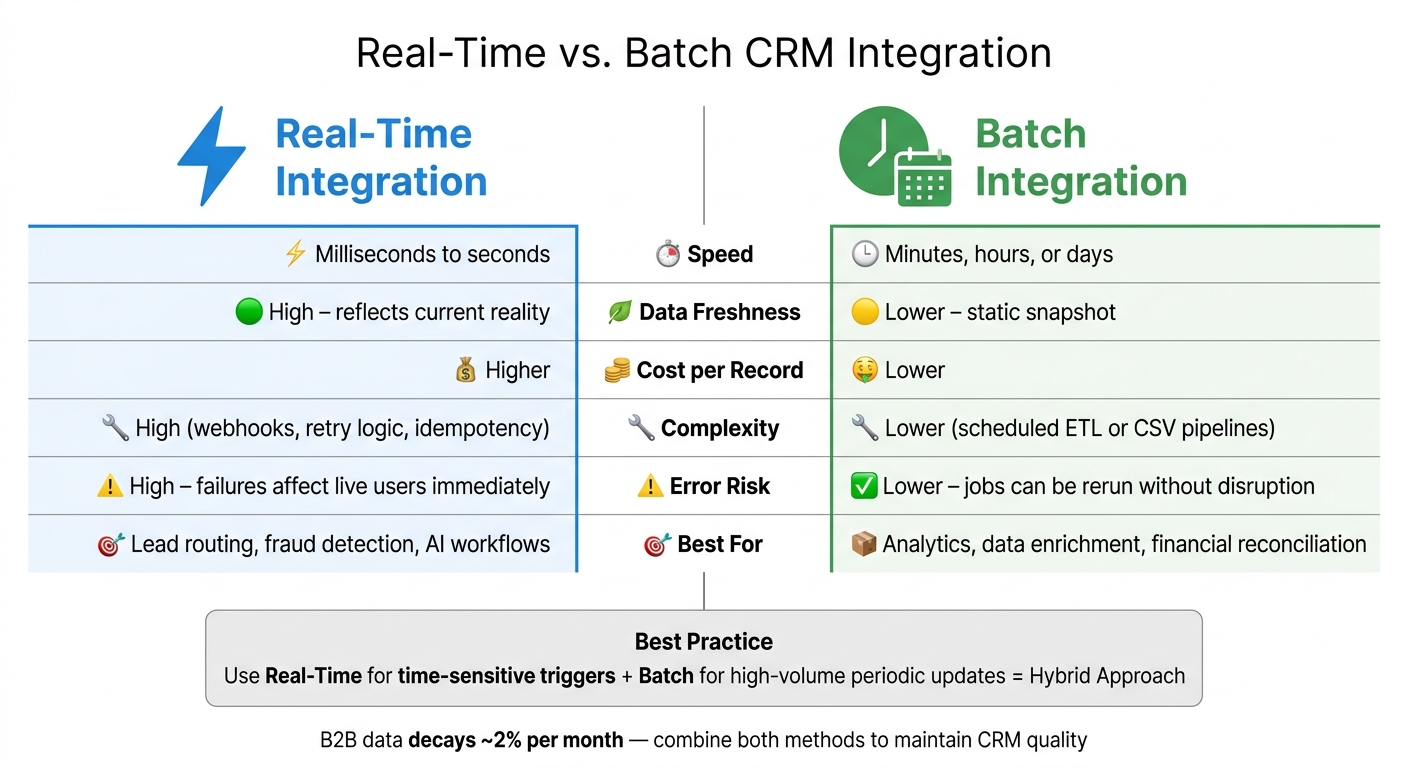
Real-Time vs. Batch CRM Integration: Key Differences at a Glance
Real-Time CRM Data Integration
What Is Real-Time CRM Data Integration?
Real-time CRM data integration ensures records are updated almost instantly – within milliseconds or seconds – whenever an event occurs. Instead of relying on scheduled synchronization, this approach triggers updates immediately as changes happen.
These updates are powered by technologies like webhooks (instant HTTP POST requests), direct API calls (using REST, SOAP, or GraphQL), or Change Data Capture, which reads database logs directly without constant polling.
There’s also near-real-time integration, which operates with a slight delay, typically within 1 to 30 seconds. This method uses short-interval polling or buffered streams, making it a good alternative when sub-second speed isn’t essential but timely updates are still important.
Benefits of Real-Time Integration
The biggest advantage is keeping data current. Real-time integration eliminates database latency – the delay between a record changing and your CRM reflecting that update. Unified.to explains it best:
"Salespeople notice when their CRM dashboard shows yesterday’s deal stage. AI agents that recommend next actions on stale data lose user trust quickly."
Fresh data isn’t just about accuracy; it empowers faster decisions. Sales teams get up-to-date pipeline insights. Support agents see the latest customer interactions. AI-driven workflows, such as personalized outreach or next-best-action recommendations, rely on accurate data to avoid missteps. For example, a wrong job title or outdated company status can turn a tailored message into an awkward misfire.
From a compliance perspective, real-time pass-through architectures have an added edge. By routing requests directly to the source CRM without storing data at rest, they can minimize compliance risks compared to sync-based systems that cache records.
When to Use Real-Time Integration
Real-time integration is essential when delayed data leads to tangible losses – whether that’s a missed lead, an oversold product, or a service failure. Here are some scenarios where it proves indispensable:
| Scenario | Why Real-Time Matters |
|---|---|
| Inbound lead routing and skip tracing | Leads cool off quickly; routing must happen within seconds of form submission |
| Live inventory tracking | Prevents overselling by instantly reflecting stock changes |
| Payment & subscription events | Immediate entitlement updates avoid errors in access or billing |
| AI sales assistant context | AI-powered tools need real-time data to deliver relevant, accurate outreach |
In these cases, webhooks are far more efficient than polling. Polling relies on scheduled data requests, which can increase latency and API usage. Webhooks, on the other hand, push data as soon as an event occurs, reducing both delays and unnecessary API calls. When designing webhook-based systems, ensure your endpoint responds with an HTTP 200 immediately and processes additional tasks asynchronously to prevent timeouts.
These real-time use cases highlight the contrast with bulk processing methods, which will be explored further in the next section.
sbb-itb-8058745
Batch CRM Data Integration
What Is Batch CRM Data Integration?
Batch CRM data integration involves processing large amounts of data at scheduled intervals – whether hourly, nightly, or weekly – rather than handling updates as they occur in real time. Instead of updating records one by one, this method consolidates changes and transfers them all at once.
At the heart of batch processing is the ETL process: Extract, Transform, and Load. Here’s how it works: data is pulled from one or more sources, cleaned and standardized during the transformation stage, and then loaded into the target CRM as a single batch. This step-by-step process not only ensures data quality but also acts as a safeguard against errors before they can affect your database. By using bulk API endpoints – like Salesforce‘s Bulk API 2.0, which can handle up to 10,000 records per batch, or Batch Apex, capable of managing up to 50 million records in a single job – this approach efficiently processes large datasets.
Batch processing is particularly effective in situations where immediate data updates aren’t necessary. Let’s break down why this method stands out.
Benefits of Batch Integration
One of the biggest advantages of batch integration is the reduction in API calls. By grouping records together, this approach cuts down on API usage, which helps lower costs. Additionally, batch processing simplifies error management. If something goes wrong, you can rerun the job without disrupting live sessions or active workflows.
Cost savings are another key benefit. As Databar.ai explains:
"Batch enrichment typically costs less per record than real-time. When you’re processing tens of thousands of records and don’t need instant results, the economics favor batch."
Beyond cost, batch integration streamlines your system architecture. You won’t have to manage webhooks, monitor message queues, or build complex retry mechanisms. Scheduling jobs during off-peak hours also helps reduce system strain and ensures your CRM remains responsive for live users.
These advantages make batch integration a great fit for specific high-volume use cases, where accuracy and efficiency take precedence over speed.
When to Use Batch Integration
Batch integration is ideal when data freshness isn’t urgent but accuracy and volume are critical. Some common scenarios include:
- Nightly financial reconciliations between an ERP and CRM
- Migrating historical data during system upgrades using a real estate API
- Bulk contact enrichment ahead of a major outbound campaign
- Database deduplication across tens of thousands of records
As Codeless Platforms puts it:
"Batch integration is ideal for heavy-volume, non-urgent operations."
For datasets exceeding 100,000 records, it’s best to split the job into smaller chunks – 10,000 records per batch – to avoid timeouts and stay within system limits.
While batch processing doesn’t offer immediate updates like real-time methods, it shines in scenarios where efficiency, cost-effectiveness, and high-volume processing are more important than instant results.
Batch Processing vs Real-Time Streaming Data – Understanding the Key Differences | Uplatz
Real-Time vs. Batch CRM Integration: Key Differences
Real-time integration and batch processing serve distinct purposes in CRM systems, each excelling in different scenarios. While real-time integration prioritizes speed and up-to-date data, batch processing focuses on affordability and reliable error handling.
Side-by-Side Comparison
| Feature | Real-Time Integration | Batch Integration |
|---|---|---|
| Latency | Milliseconds to seconds | Minutes, hours, or days |
| Data Freshness | High (reflects current reality) | Lower (matches a static snapshot) |
| Cost | Higher per record | Lower per record |
| Complexity | High (requires webhooks, retry logic, idempotency) | Lower (scheduled ETL or CSV pipelines) |
| Error Risk | High (failures affect live users immediately) | Lower (jobs can be rerun without disruption) |
| CRM Fit | Sales routing, lead qualification, fraud detection | Analytics, data warehousing, historical migrations |
The table illustrates the trade-offs between these two methods. While real-time integration ensures minimal latency and reflects the most current data, it comes with higher costs and complexity. On the other hand, batch integration is less expensive and simpler to manage but operates on delayed data snapshots. Importantly, even a fast API response doesn’t guarantee real-time accuracy if the data it retrieves is outdated.
How to Choose Based on Business Needs
The right choice depends on your specific requirements. Consider factors like the speed of data needed, the volume of records, and your budget.
Real-time integration is ideal when timing is critical. For example, routing inbound leads immediately after a form submission can significantly boost conversion rates. On the flip side, batch integration is better suited for handling large volumes of data when speed isn’t a priority, such as nightly financial reconciliations between an ERP and CRM or preparing thousands of contacts for a marketing campaign.
Ruben Burdin, Founder & CEO of Stacksync, captures this balance perfectly:
"The question isn’t which is ‘better’ but when each approach makes sense for your specific workflows."
Many businesses adopt a hybrid strategy, leveraging real-time for time-sensitive triggers and batch processing for periodic updates. This combination allows for responsiveness where it matters while keeping costs manageable.
Understanding these differences helps set the foundation for choosing the right CRM integration approach for your needs.
CRM Use Cases for Each Integration Method
Real-time and batch workflows serve different operational purposes, each excelling in specific scenarios. Let’s explore where these methods shine.
Real-Time CRM Workflows
Real-time integration is a must when delays could hurt revenue or customer experience. Take lead routing, for example: new leads can be instantly enriched and assigned to the right sales rep, ensuring no opportunity is missed. It also supports form shortening, where collecting just an email address triggers automatic profile enrichment, boosting conversion rates.
Another key area is live customer support. When a customer calls, support agents need up-to-date case details, subscription changes, and interaction history – not outdated data. Similarly, trigger-based sales sequences rely on real-time signals. For instance, if a prospect visits your pricing page or a target account updates its technology stack, these events can immediately trigger alerts or personalized outreach.
While real-time workflows prioritize instant action, batch workflows are better suited for systematic, large-scale tasks.
Batch CRM Workflows
Batch integration is ideal for handling high-volume tasks that aren’t time-sensitive. A great example is bulk data enrichment: refreshing thousands of outdated CRM records with updated job titles, verified emails, or company information. This can be scheduled monthly or quarterly, providing a cost-effective way to manage data decay.
"Batch enrichment typically costs less per record than real-time. When you’re processing tens of thousands of records and don’t need instant results, the economics favor batch." – Databar.ai
Other use cases include analytics reporting, compliance audits, and financial reconciliation. For instance, nightly syncs between your CRM and ERP system, periodic regulatory checks, or preparing large outbound campaign lists can all tolerate a few hours of delay. These workflows help manage API usage efficiently while keeping costs predictable.
Choosing the Right CRM Integration Model
Key Decision Factors
Selecting the right integration model begins with four critical questions: How current does your data need to be? How large is your dataset? What are your API limitations? And how much maintenance can your team manage?
If outdated data could cost you a deal – like sending an email with an incorrect job title – real-time integration might be your best bet. On the other hand, if you’re working with tens of thousands of records and timing isn’t a dealbreaker, batch processing can often be a more cost-effective solution.
For many growing businesses, a hybrid approach strikes the right balance. For example, you can use real-time enrichment for new leads and high-priority accounts while scheduling batch updates to handle data decay. However, managing two pipelines comes with challenges, such as increased engineering demands and the risk of conflicting updates if both systems modify the same record simultaneously.
"Real-time and batch CRM integration are complementary. Real-time powers immediate workflows and customer experience improvements; batch handles volume-driven, analytical and reconciliation tasks." – Codeless Platforms
Another option to consider is near-real-time integration, which operates with a slight delay, usually between 1 and 30 seconds. This method avoids the API spikes of true real-time processing while still offering the responsiveness needed for most sales and support tasks.
Now, let’s explore how BatchData simplifies both real-time and batch integration to meet these needs.
How BatchData Supports CRM Integration
BatchData is designed to meet the demands of both integration models. Its APIs enable real-time tasks like lead qualification, skip tracing property owners, and phone verification, providing enriched contact and property data in just seconds. For large-scale operations, BatchData’s bulk data delivery service efficiently processes high volumes of records, making it ideal for CRM cleanups, historical data enrichment, and preparing outbound campaigns.
The platform’s flexible pay-as-you-go pricing model accommodates both one-time batch enrichments and ongoing API calls, making it adaptable to different CRM requirements. For businesses with more intricate needs, BatchData also offers custom data pipelines and professional services to help design and implement an integration strategy tailored to your workflows and data freshness priorities.
Conclusion: Matching Your CRM Integration Method to Your Goals
Aligning your CRM integration strategy with your business objectives is essential. There’s no one-size-fits-all solution – it all depends on factors like workflow urgency, data volume, and how quickly you need responses.
"The question isn’t which is ‘better’ but when each approach makes sense for your specific workflows." – Ruben Burdin, Founder & CEO, Stacksync
If your focus is on tasks like closing deals quickly, routing leads efficiently, or leveraging AI-driven outreach, real-time integration ensures your CRM stays updated for immediate action. On the other hand, batch processing works best for large-scale data enrichment, nightly updates, or seasonal campaigns. It delivers accuracy at a lower cost, making it a smart choice for non-urgent, high-volume tasks. Considering that B2B data decays at about 2% per month, combining real-time updates for new records with periodic batch refreshes for existing data can help maintain quality.
Instead of sticking to a single method, match your integration approach to the urgency and scale of your workflows. For example, BatchData supports both real-time enrichment and bulk data processing. Its APIs can handle tasks like skip tracing, phone verification, and lead qualification in seconds, while its bulk delivery service is designed for high-volume CRM cleanups and outbound campaign preparation. Plus, it operates on a flexible pay-as-you-go model, adapting to your specific needs.
Take a close look at your time-sensitive processes and high-volume tasks to create the best integration mix for your business.
FAQs
How do I choose the right sync frequency for my CRM?
The best sync frequency boils down to your specific needs and priorities. If your operations demand instant updates – like in sales or customer service – real-time integration is the way to go. It ensures data is refreshed within seconds, keeping everything current. On the other hand, for tasks like bulk updates or data enrichment, batch synchronization is a smarter option. Scheduled hourly or daily, it’s both cost-efficient and easier to manage. The key is finding the right balance between real-time precision and resource efficiency.
What’s the easiest way to prevent duplicate or conflicting updates?
To avoid duplicate or conflicting updates during CRM data integration, consider a hybrid strategy that blends real-time and batch processing. Real-time updates are ideal for urgent changes that need immediate attention, while batch updates are better suited for handling large volumes of data at once.
Key practices include using unique record identifiers to differentiate entries, establishing clear precedence rules to determine which data takes priority, and implementing validation checks to ensure data accuracy. Additionally, incorporating version control during synchronization helps reduce conflicts, ensuring updates across systems remain consistent and dependable.
When is near-real-time “good enough” instead of true real-time?
Near-real-time processing is ideal when tasks can tolerate a slight delay, typically ranging from a few seconds to a minute. This approach works well for workflows like routing leads or updating records – situations where instant action isn’t essential, but timely updates are still important. It strikes a balance between latency, cost, and system complexity, providing a practical alternative to the higher expenses and infrastructure requirements of true real-time systems.