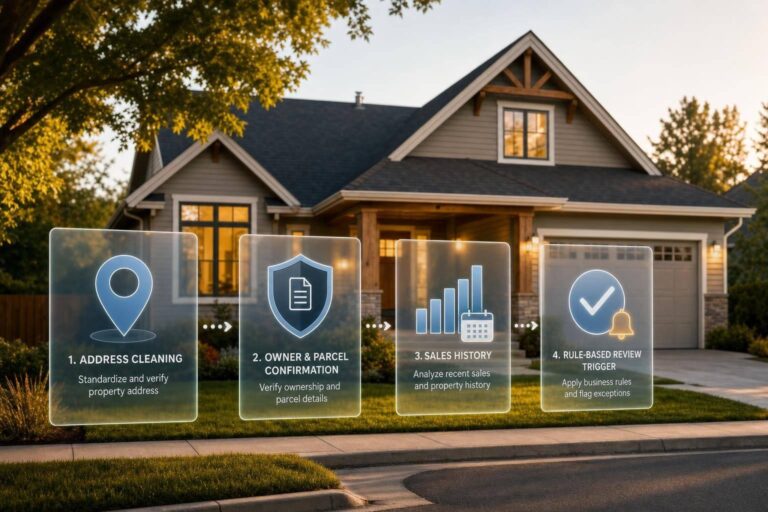
Most mortgage valuation delays start with bad inputs, not bad models. I’d sum this topic up in one line: if I clean the address, confirm the owner and parcel, pull sale history, and apply rule-based triggers, I can move collateral review with fewer bad matches and fewer manual checks.
Here’s the full picture in simple terms:
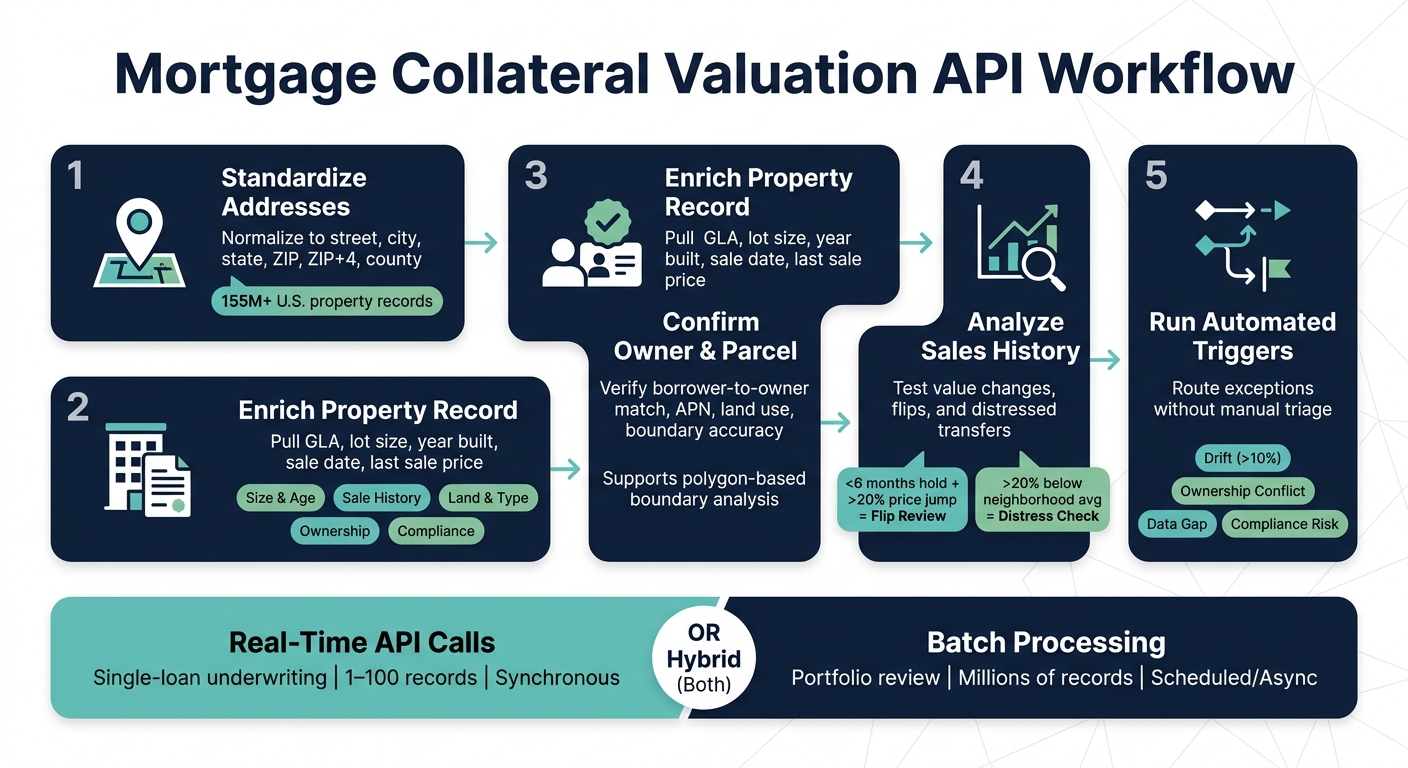
- First, I standardize addresses so each loan ties to the right property record.
- Then, I enrich the record with fields like square footage, lot size, year built, sale date, and last sale price.
- Next, I confirm owner and parcel details to check borrower-to-owner match, APN linkage, land use, and boundary accuracy.
- After that, I use sales history to test value changes, flips, and distressed transfers.
- Finally, I run trigger rules for drift, ownership conflict, missing data, and compliance flags.
This matters at both ends of the pipeline. For single-loan underwriting, I’d use real-time API calls. For portfolio review across thousands or millions of records, I’d use batch jobs with files like CSV, JSON, or Parquet. And for many lenders, a mix of both makes sense.
A few numbers stand out. The article points to 155,000,000+ U.S. property records, plus rule examples such as:
- >10% value drift for analyst review
- <6 months hold period and >20% price jump for flip review
- >20% below neighborhood price per square foot for distress checks
Quick comparison
| Workflow step | Main question I’m answering | Common output |
|---|---|---|
| Address cleanup | Is this the right property? | Standardized address, ZIP+4, county, property match |
| Property enrichment | Do I have the right collateral fields? | GLA, lot size, year built, property type, sale facts |
| Owner and parcel match | Does the borrower match the record, and is the parcel right? | Owner-of-record status, APN, land use, boundary data |
| Sales history review | Does the value story make sense over time? | Last sale price, sale date, hold period, price per sq. ft. |
| Trigger-based routing | Should this file move to manual review? | Review queues for drift, fraud, title, distress, or compliance |
If I were building this workflow, I’d keep it simple: resolve the property first, pull only the fields needed, and let fixed rules route the outliers.
Mortgage Collateral Valuation API Workflow: 5-Step Process
1. Bulk address checks and property enrichment
Bulk address validation before valuation calls
Before a valuation call goes out, every address in the pipeline needs to be clean and standardized. Data from loan origination systems (LOS), servicing platforms, and portfolio exports often comes in messy or inconsistent. And it only takes one bad address to cause trouble. An AVM call can fail, or worse, match the wrong property.
The fix starts early. Normalize each record to street, city, state, ZIP, ZIP+4, and county before any downstream valuation call. In high-volume pipelines, this usually runs as a nightly batch job through async endpoints or SFTP extracts in CSV, JSON, or Parquet. Doing this at ingestion has another upside: it helps collapse duplicate records, which cuts down on repeat valuation calls for the same asset.
Once the address is resolved, enrichment can pull the property fields needed for collateral review.
Property enrichment fields that support collateral decisions
After an address maps to a single property ID, enrichment pulls the fields that matter for collateral decisions. In practice, the most useful data falls into five groups:
| Enrichment Category | Key Fields | How It’s Used |
|---|---|---|
| Size & Age | Gross living area (GLA), total building area, stories, year built | Defines like-for-like ranges for comparable selection |
| Sale History | Last sale price, price per square foot, sale date, hold period | Flags rapid appreciation or recent flips |
| Land & Type | Lot size (acres/sq ft), property type, land use code, vacancy status | Confirms zoning consistency and surfaces vacant land risk |
| Ownership | Owner name, ownership type (individual, LLC, trust, or corp), owner-occupied flag | Verifies borrower and ownership consistency |
| Compliance | DNC/TCPA flags, litigator indicators, deceased indicators | Filters ineligible records before servicing or disposition |
The goal isn’t to pull every field available. It’s to request only what the workflow needs. That keeps the process tighter and easier to manage. Teams lean on these fields to spot exceptions fast, like a property marked vacant but also marked owner-occupied, or a year-built value that falls outside the expected range for the subject property.
The next call is about delivery mode: one-off lookup or bulk enrichment, which are key components of real estate APIs.
Batch enrichment vs. real-time lookups: a comparison
Use real-time lookups for single applications. Use batch enrichment for portfolio-scale revaluation. That split keeps things simple.
| Feature | Real-Time Lookups | Batch Enrichment |
|---|---|---|
| Throughput | Low (one record at a time) | Very high (millions of records) |
| Latency | Synchronous/immediate | Asynchronous/scheduled |
| Consistency | Single-request point in time | Uniform across the dataset |
| Retry Handling | Managed by the application | Managed in batch logic or SFTP reruns |
| Delivery Format | JSON response | CSV, JSON, or Parquet via SFTP |
| Best Fit | Underwriting queues, loan applications | Portfolio monitoring, servicing, revaluation |
BatchData supports both real-time property search and address verification, plus bulk delivery for scheduled portfolio work.
After address cleanup and enrichment, owner and parcel resolution can run against the same normalized record.
sbb-itb-8058745
AskNAN – Passed the UAD Compliance Check… So Why Is the Appraisal Being Sent Back?
2. Owner match, parcel lookup, and property resolution
After you clean up the address, the next step is identity and parcel confirmation.
Owner match for borrower and title consistency checks
Once the address is normalized, check whether the borrower or vesting entity matches the owner of record. Owner-match APIs can return owner status, named co-owners, and ownership type – individual, LLC, trust, or corporation.
That ownership type field matters. If a property sits in an LLC or trust, title-match checks often need manual review. Teams can also add compliance scrubbing – DNC, TCPA, litigator, and deceased indicators – to filter higher-risk contacts before they move into servicing queues.
BatchData APIs can resolve a phone number or email into a specific person and their linked property in one request – returning owner-of-record status and property ID together.
Parcel lookup for lot size, land use, and boundary accuracy
Mailing addresses and situs addresses don’t always line up. That’s common with rural routes, condos, and new construction. Parcel lookup fixes that by tying the address to an Assessor’s Parcel Number (APN) and pulling the fields that matter for collateral review: lot size in acres and square feet, standardized land use, property class, subdivision, and boundary geometry.
Polygon geometry is a big deal here. It lets teams screen at the boundary level, which a simple radius search can’t do. That matters when a subject property sits near a school district line or a neighborhood edge. It’s also helpful for condos and other multi-unit properties, where address-only records can get messy.
Address-based records vs. parcel-based records: a comparison
Both record types fit into the workflow, but they do different jobs. Address-based records are fast and easy to plug in, so they work well for early lead intake and CRM enrichment. Parcel-based records are the better anchor for underwriting, appraisal, and risk screening, where lot size, land use, and boundary accuracy can affect the collateral call.
| Feature | Address-Based Records | Parcel-Based Records |
|---|---|---|
| Data Accuracy | Lower; prone to mailing vs. situs address confusion | High; tied to unique APN/Property ID |
| Match Reliability | May fail on new builds, rural routes, or condos | High; uses legal boundaries and parcel geometry |
| Geospatial Risk | Limited to point-based or radius analysis | Supports polygon-based risk and boundary analysis |
| Storage Needs | Leaner; primarily text-based strings | Higher; requires storage of geospatial coordinates and IDs |
| Complexity | Simple; standard CRM/database field | High; requires linking identity and property graphs |
With the collateral record resolved, the workflow can move into sales-history pulls and automated review triggers.
3. Sales history pulls, valuation inputs, and automated review triggers
Once the parcel and owner are resolved, sales history adds the time layer needed to check current value. That’s what turns a cleaned-up collateral record into a clear review call.
Sales history and mortgage history as valuation inputs
The most useful sales-history fields are usually the derived ones. Last sale price, sale date, price per square foot, and hold period all help teams test whether today’s value estimate makes sense.
Hold period matters a lot. It measures the time between the prior sale and the current one. If a property resells within six months and the price jumps hard, that can point to a flip or possible fraud.
Price-per-square-foot data helps for a simple reason: it puts properties on a common scale. In markets where raw sale prices are tough to compare, this makes value checks easier and cuts down on market-by-market rule changes.
Automated review triggers for underwriting and servicing
Trigger rules work best when they tie to exact returned fields. A valuation drift trigger should fire when the current estimated value moves by more than 10% from the prior AVM or purchase price. An ownership conflict trigger should fire when the owner-of-record flag comes back false or when the name on file does not match the borrower application. Distressed transfers, meaning sales more than 20% below the neighborhood average price per square foot, should move to inspection review.
Compliance signals should sit inside the same rule set. If a deceased_indicator or litigator_indicator returns true on a property lookup, automated outreach should stop and the file should move to legal or compliance.
Trigger matrix: event type, required fields, and workflow action
The end result is a tight ruleset that can route files without manual triage. The table below shows several trigger types, the API fields each one needs, the threshold logic that makes each trigger usable, and the workflow step it should start.
| Trigger Event | Required API Fields | Recommended Threshold/Logic | Workflow Action |
|---|---|---|---|
| Valuation Drift | estimated_value, low_bound, high_bound, last_sale_price |
Change > 10% from prior AVM or purchase price | Escalate to analyst; request manual appraisal review |
| Rapid Resale (Flip) | hold_period, last_sale_date, last_sale_price |
Hold period < 6 months AND price increase > 20% | Escalate for predatory lending or fraud review |
| Ownership Conflict | owner_of_record_flag, ownership_type, identity_name |
Flag = False OR name mismatch with borrower application | Trigger title consistency check |
| Distressed Transfer | last_sale_price, price_per_sq_ft, listing_status |
Sale price > 20% below neighborhood average per sq ft | Flag for inspection or distress review |
| Data Integrity Gap | living_area, year_built, lot_size |
Null or "0" values in core characteristic fields | Auto-trigger enrichment call before valuation proceeds |
| Compliance Risk | deceased_indicator, litigator_indicator |
Any "True" flag returned | Halt automated outreach; escalate to legal/compliance |
BatchData (batchdata.io) supports these trigger patterns through its property enrichment APIs and bulk delivery options – CSV, JSON, or Parquet. That makes it practical to feed both real-time underwriting queues and scheduled portfolio surveillance runs from the same data layer.
These trigger rules can support event-driven, batch, and hybrid workflows. In practice, the same logic can plug into all three processing models.
4. Architecture patterns for mortgage collateral API stacks
Event-driven, batch, and hybrid processing models
Those trigger rules only hold up in production when the stack lines up with the job in front of it: speed, volume, and cost all need to fit the workflow. For most mortgage collateral use cases, teams usually land on three patterns. In plain English, that means real-time for active files, batch for portfolio jobs, and hybrid when you need both.
Event-driven calls are a strong fit for active underwriting. When a new application comes in, synchronous calls can return ownership and property data right away. Batch processing fits portfolio surveillance better. A nightly job can mark thousands of holdings to market as new neighborhood sales come in, without eating into real-time capacity. Hybrid setups do both at once: synchronous endpoints for new applications, plus scheduled SFTP extracts in CSV, JSON, or Parquet for the existing portfolio.
| Pattern | Best Fit | Volume | SLA |
|---|---|---|---|
| Event-driven (API) | Underwriting, inbound inquiries | 1–100 records per call | Synchronous / immediate |
| Batch (Bulk/SFTP) | Portfolio revaluation, surveillance | Millions of records | Scheduled / asynchronous |
| Hybrid | Active files + portfolio monitoring | Mixed | Both |
At scale, the bigger problem usually isn’t raw speed by itself. It’s duplicate writes and uneven compliance handling.
Data engineering and compliance considerations
Idempotency is the first thing to nail down. If every call uses a stable property identifier, retries caused by a timeout or a short upstream failure won’t create duplicate valuation records or conflicting ownership history. Effective dates should be stored in MM/DD/YYYY format, and USD value changes should be tracked so teams have a defensible audit trail for U.S. mortgage operations.
Compliance flags should come back inline with the property record. That way, suppression can happen before any downstream action fires.
For defendable decisions, teams should lean toward APIs that let them set match parameters like distance, year built, or lot size instead of relying on black-box model scores. If the output matters in review, being able to explain why a match was made makes a big difference.
Multi-source data redundancy also helps keep coverage steady when one upstream feed slows down or fails. BatchData provides access to over 155 million U.S. property records, assembled from multiple independent sources. That gives scheduled revaluation jobs a better shot at staying on track when a single feed lags.
Conclusion: API use cases that create the most leverage
Once these patterns are in place, the valuation workflows from Sections 1–3 can run at scale.
A common rollout path is simple. Start with real-time address and property resolution for active files. Then add scheduled batch refreshes for the portfolio. Owner and parcel resolution help confirm borrower identity and property boundaries before any value estimate runs. Sales history adds the time layer needed to track value and equity positions as new sales come in. From there, automated triggers can route only the exceptions.
A unified data layer makes that much easier to build and manage. BatchData (batchdata.io) provides property enrichment, contact enrichment, bulk delivery, and developer-friendly APIs through a single integration, which helps technical teams keep ownership, valuation, and mortgage history connected in one place.
FAQs
Why resolve the property before running a valuation?
Resolving the property first helps make the valuation accurate and easy to defend. It gives your model a checked, consistent data base before it compares things like size, age, property type, and recent sales.
That also makes the result easier to explain. The valuation is tied to specific comparable matches and data you can verify.
When should I use real-time APIs instead of batch jobs?
Use real-time APIs for interactive apps that need immediate, structured data. They also make sense for event-driven workflows, where a specific action kicks off research right away.
Use batch jobs for scheduled, high-volume analysis. If you’re processing millions of properties, batch work is usually the better fit because large-scale ingestion matters more than an instant response.
Which triggers should send a loan to manual review?
Send a loan to manual review when AVM results look like outliers, point to higher-risk situations, or fall outside quality-control standards. Manual review is also needed when the value relies on details that need a person to verify for compliance.
Automated results do not replace a formal appraisal from a licensed professional. So if the valuation will be used for credit decisions or other regulated activities, a manual review is required.