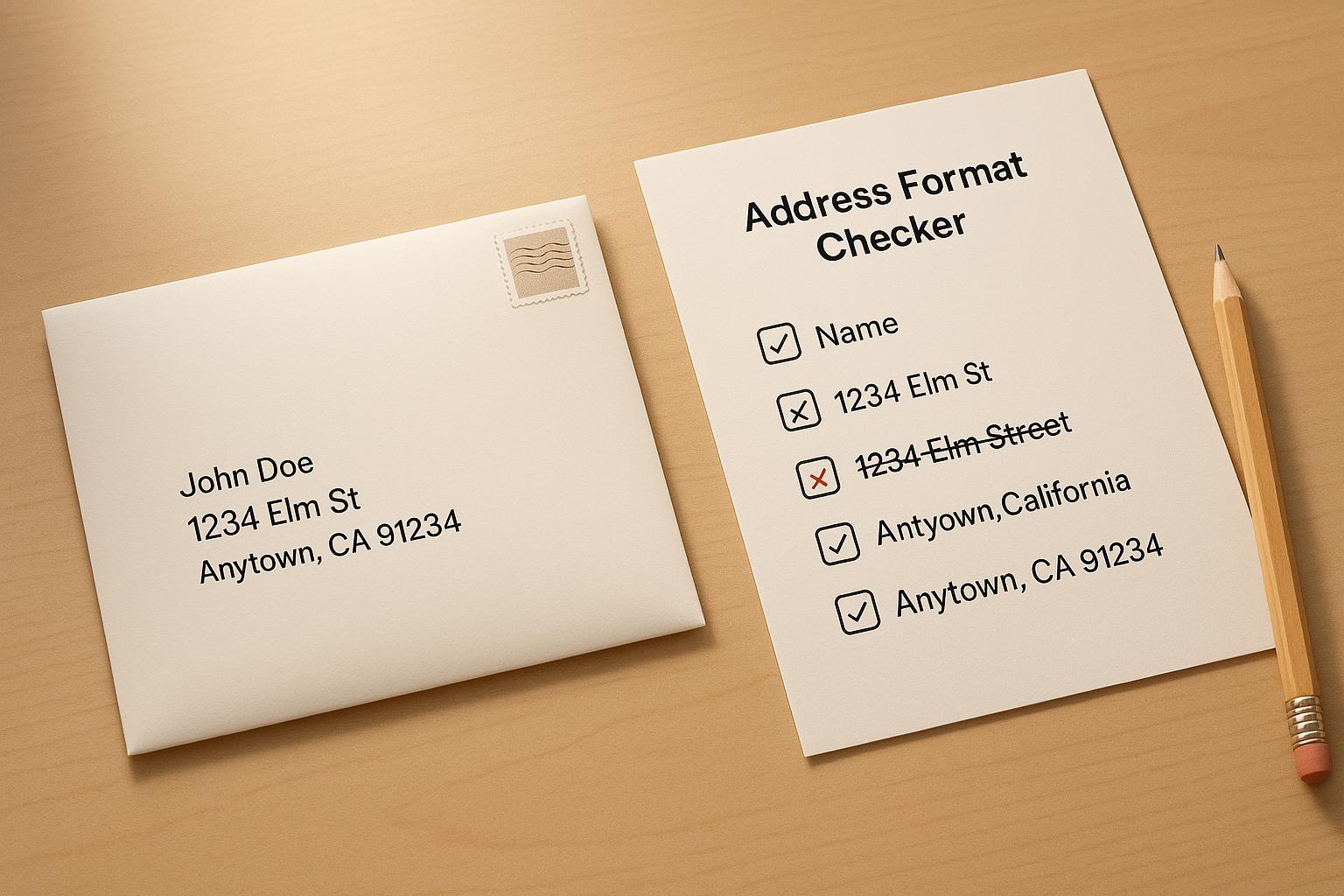
Your CRM’s performance depends on accurate, complete, and up-to-date data. If your database is cluttered with outdated records, duplicate entries, or incomplete property details, it can slow down operations, waste marketing budgets, and bury potential leads.
Real estate APIs offer a solution by automatically updating missing fields like property addresses, valuations, and ownership details. This makes your CRM more effective, allowing your team to focus on high-value leads and close deals faster. For example, real estate teams have used data enrichment to uncover hidden opportunities, leading to faster transactions and increased revenue.
Here’s a simple 5-step process to clean and improve your CRM:
- Audit your data: Identify errors, missing fields, and duplicates.
- Clean and standardize: Fix formatting issues, remove duplicates, and ensure consistency.
- Integrate property data APIs: Add detailed property insights like valuations, ownership history, and financial metrics.
- Automate updates: Use scheduled API calls to keep your CRM current without manual effort.
- Measure results: Track metrics like conversion rates and data accuracy to evaluate the impact.
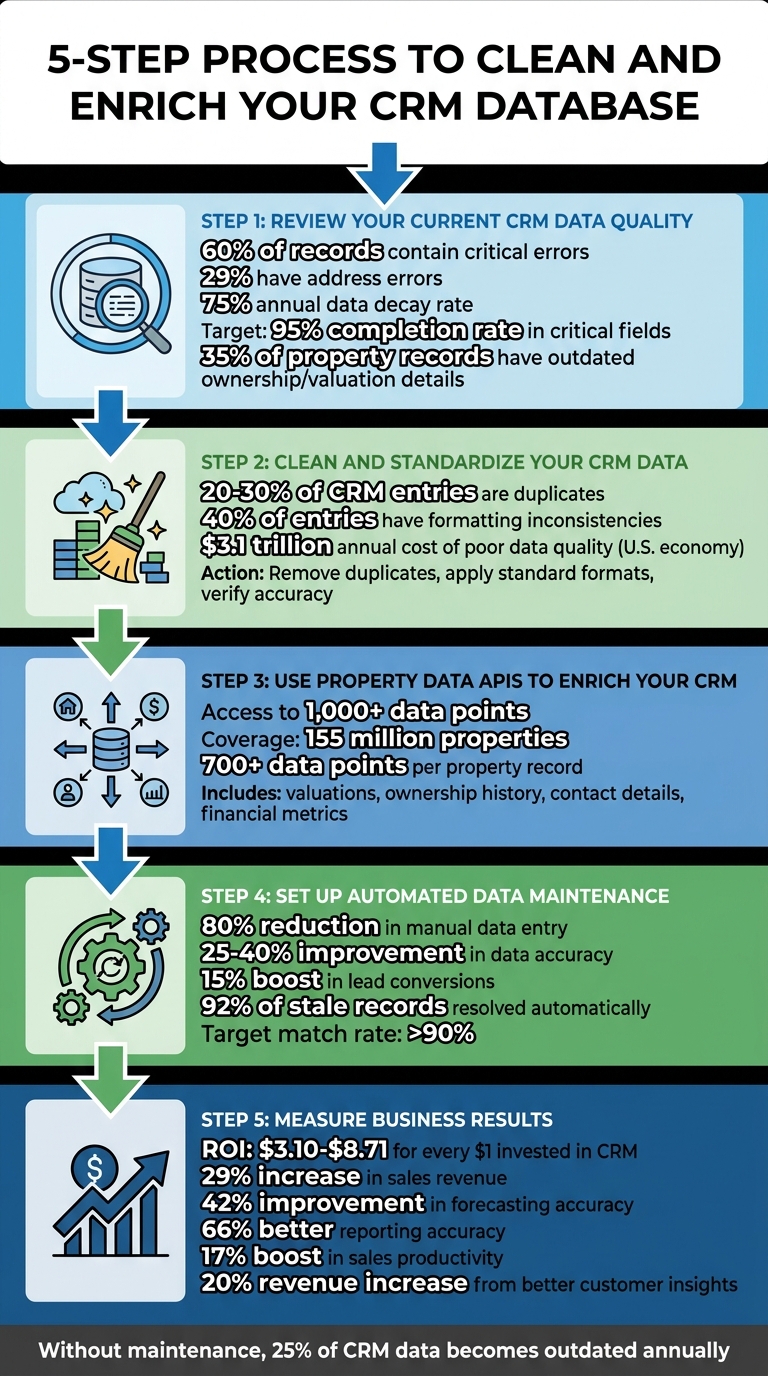
5-Step Process to Clean and Enrich Your CRM Database with Property Data APIs
Step 1: Review Your Current CRM Data Quality
Start by auditing your CRM to identify major issues. A recent audit revealed that 60% of records contain critical errors – with address errors at 29% and an annual data decay rate of 75%. These numbers underscore the importance of cleaning and maintaining your data.
Begin by exporting your CRM data into a spreadsheet for a clear, comprehensive view. Platforms like Salesforce, HubSpot, and Pipedrive typically include reporting dashboards that highlight field completion rates and flag missing information. Aim for a 95% or higher completion rate in critical fields to ensure your data is reliable. This initial review lays the groundwork for effective data cleaning and updating.
Find Missing or Incorrect Data Fields
Create a detailed inventory of all necessary fields for your property records. This should include details like property address, type, square footage, lot size, year built, assessed value, and ownership information. Run a field-level analysis to identify records with empty or null values. Use conditional formatting in your spreadsheet to highlight these gaps quickly.
In real estate CRMs, 35% of property records typically contain outdated ownership or valuation details. This means more than one-third of your records might lead your team to pursue dead leads or contact the wrong people. To catch errors that automated tools might overlook, manually verify a random sample of 50–100 records against public property databases or MLS data. For example, you may find properties incorrectly listed as single-family homes when they’re actually condos or square footage discrepancies of thousands of feet.
Once you’ve identified missing or incorrect data, tackle redundancies and formatting inconsistencies to further refine your records.
Detect Duplicate Records and Format Issues
Duplicate records, which affect 20–30% of CRM entries, can waste both time and resources. Use your CRM’s built-in duplicate detection tool to compare records based on property address, owner name, phone number, or email. You can also sort your exported data by address or owner name to manually spot near-duplicates, such as "John Smith" versus "Jon Smith" tied to the same property.
Formatting inconsistencies are another major issue, with up to 40% of entries suffering from errors. These include mismatched state abbreviations (e.g., "IL" versus "Illinois"), inconsistent phone number formats, or varied date structures. Document these errors to guide your cleanup efforts and create processes to prevent them from recurring.
Addressing these issues is a critical step before integrating property data APIs to enhance your CRM data. Using a property data API allows you to automate this enrichment process at scale. By identifying and resolving these problems early, you’ll set the stage for more accurate and efficient operations.
sbb-itb-8058745
Step 2: Clean and Standardize Your CRM Data
Once you’ve identified the issues in your CRM, it’s time to clean and standardize your data. This step is crucial before integrating property data APIs. Why? Because poor data quality costs the U.S. economy $3.1 trillion every year. Standardized records ensure that API calls can properly match and enhance your data, avoiding expensive mistakes and failed lookups.
Remove Duplicates and Merge Records
Start by consolidating duplicate entries using your CRM’s merge function. Establish clear rules for selecting the master record – like prioritizing the most recent update or the most complete record.
For entries with slight discrepancies, such as "Street" versus "St.", use fuzzy matching techniques. This approach helps resolve common variations in addresses or owner names, which is especially helpful given that 20% to 30% of data in unmanaged CRMs is typically duplicated.
Once duplicates are eliminated, you can move on to standardizing the data formats, which is key to achieving smooth API integration.
Apply Standard Data Formats
Consistent formatting is essential for API compatibility. Use standardized formats for dates (MM/DD/YYYY), currency (USD, $), and area measurements (square feet). Enforce these standards through CRM field validation tools.
Leverage dedicated field types – like date pickers, dropdown menus, and number fields – to prevent inconsistent data entry. Automated formatting workflows, such as HubSpot’s "Format Data" feature, can handle tasks like capitalizing first letters, converting text to title case, and removing extra spaces. For instance, hidden spaces in address fields can cause API lookups to fail, even if the text appears correct.
Also, make sure to standardize phone numbers (e.g., (555) 555-5555) and ensure addresses align with USPS postal standards. Pay special attention to property-specific details like the number of bedrooms, bathrooms, square footage, and floor levels, as these attributes are critical for property valuation and comparisons by APIs.
After standardizing your data, the next step is to verify its accuracy to prevent errors from spreading.
Verify Data Accuracy
Before enriching your CRM with property data APIs, verify the cleaned records against trusted sources. Use address validation services to cross-check entries with USPS databases or other authoritative references. Additionally, manually review a sample of 50–100 records to ensure accuracy in date formats, currency, and address details. This step is vital to catch any lingering errors and ensures that your CRM is ready for API integration without spreading inaccuracies.
Step 3: Use BatchData Property Data APIs to Enrich Your CRM
Once your CRM data is cleaned and standardized, it’s time to level up by adding detailed property insights. BatchData opens the door to over 1,000 data points spanning 155 million properties. This transforms basic addresses into rich, actionable profiles. By enriching your CRM with property valuations, ownership history, contact details, and financial metrics, you can make smarter, more informed decisions. The next step? Seamlessly integrating these APIs into your CRM.
Connect BatchData APIs to Your CRM
The first step is aligning your CRM fields with the endpoints provided by BatchData APIs. For example, the Property Lookup API delivers in-depth property intelligence, while the Property Skip Trace API helps you uncover owner contact details. By using compound queries, you can pull multiple datasets – like property characteristics and owner information – in a single request. This reduces latency and simplifies the data retrieval process.
BatchData offers flexible delivery options. You can access real-time API lookups for instant insights – perfect during sales calls – or opt for bulk data delivery through AWS S3, Snowflake, or flat files to enrich your entire database. To ensure a smooth integration, map the relevant CRM fields to the corresponding API outputs. Once connected, you can automate the enrichment of each property record.
Add Property Details to CRM Records
With BatchData, every property record in your CRM can be enhanced with over 700 data points. These include essential building details like bedrooms, bathrooms, square footage, and construction features such as roof type and HVAC systems. Additional insights cover lot size, zoning, sales history, ownership duration, absentee status, and even information about LLC or corporate ownership structures.
Financial metrics take this a step further, helping you prioritize leads effectively. For instance, you can integrate Automated Valuation Models (AVM), estimated equity, loan-to-value (LTV) ratios, and pre-foreclosure status to evaluate investment opportunities or borrower risks. If you’re in the home services industry, permit data can reveal recent upgrades like solar panel installations, new pools, or roof replacements. These details allow you to segment your CRM by property type, value range, or improvement history, enabling precise, targeted marketing efforts.
Update and Verify Contact Information
BatchData’s skip tracing and contact enrichment features ensure your contact details are up-to-date and accurate. The platform provides verified mobile and landline numbers, email addresses, and mailing addresses, while also scrubbing against Do Not Call (DNC) and litigator lists. Each contact is assigned a reachability score, making it easier to prioritize your outreach.
Using the Address & Phone Verification API, you can eliminate invalid phone numbers and confirm mailing addresses before launching campaigns. This step minimizes wasted marketing spend and boosts response rates. Additionally, BatchData enriches records with demographic details like age, income, gender, and household size, helping you craft more personalized communication strategies.
"What used to take 30 minutes now takes 30 seconds. BatchData makes our platform superhuman." – Chris Finck, Director of Product Management
Step 4: Set Up Automated Data Maintenance with BatchData
Once your CRM is equipped with comprehensive property datasets, the next step is ensuring this information stays up-to-date. Relying on manual updates can be time-consuming and prone to errors. Instead, BatchData offers webhook integrations and scheduled API calls to automatically refresh property valuations, ownership details, and contact information. This automation can cut down manual data entry by as much as 80% in real estate workflows.
Create Regular Data Enrichment Schedules
Deciding on the right enrichment intervals is key to keeping your data accurate. BatchData allows you to configure API calls to trigger immediately for new leads and schedule recurring updates for existing records. For instance, a real estate agency might use BatchData’s property enrichment API every Monday at 2:00 AM for records older than 90 days, while new leads are enriched instantly via webhooks. Tools like Zapier, Make, or Salesforce Flow can streamline this automation process.
Use cron expressions within these platforms to set precise timing for updates. BatchData’s RESTful API endpoints support batch jobs directly through their dashboard and use OAuth to ensure secure CRM connections. To avoid overloading the system, test your schedules on a small sample (e.g., 10% of records) and implement rate limits to handle approximately 10,000 records weekly without service interruptions. Over time, automated enrichment has been shown to improve data accuracy by 25–40%, with real estate firms reporting a 15% boost in lead conversions.
Once your schedules are up and running, it’s important to track their performance and make adjustments as needed.
Track Data Quality Metrics
Monitoring the quality of your automated updates ensures consistent and reliable results. Focus on these key metrics:
- Enrichment match rate: Aim for a success rate above 90% for records enriched.
- Data freshness: Keep property information updated within a 90-day window.
- Accuracy score: Validate accuracy through periodic spot-checks.
To calculate match rates, log API responses and divide the number of successful matches by the total API requests. If your match rate drops below 85%, set up alerts to trigger a manual review. Visualization tools like Salesforce Einstein or Tableau can help you analyze trends and maintain weekly match rates above 92%, which has been linked to a 15% increase in conversion rates. Considering that 68% of businesses identify outdated data as a major CRM issue, scheduled API updates can automatically resolve 92% of stale records. Regular reviews, such as quarterly assessments, can further refine your schedules by focusing on high-value records to maximize accuracy gains.
| Metric | Target Benchmark | Purpose |
|---|---|---|
| Enrichment Match Rate | >90% | Measures successful record updates |
| Data Freshness | <90 days | Tracks how current the property data is |
| Accuracy Improvement | +30% post-enrichment | Confirms the impact of enriched data |
Step 5: Measure Business Results from Enriched CRM Data
The real benefits of automating data maintenance come into play when you tie improved CRM accuracy directly to business growth. Enhanced CRM data not only leads to better decision-making but also drives revenue. For example, studies reveal that businesses typically gain between $3.10 and $8.71 for every $1 invested in CRM software, though the actual return depends on how well the system is implemented. Salesforce data also highlights that well-optimized CRMs can boost sales revenue by 29% and improve forecasting accuracy by 42%.
Monitor Conversion and Engagement Rates
Once your CRM is enriched, it’s time to measure its impact. Start by comparing lead conversion rates before and after the data updates. Track how leads progress from their initial contact to closed deals, and analyze how long it takes to close a sale. Here’s a tangible example: saving just 10 minutes per record across 200 records weekly adds up to over 300 hours saved annually.
To calculate ROI, use this formula:
ROI = [(Total Value Gained – Total Cost) / Total Cost] x 100.
In this equation, total value includes both revenue gains from higher conversion rates and cost savings from reduced manual work. Total cost encompasses API subscription fees, setup expenses, training, and ongoing maintenance.
To keep your CRM clean and efficient, use USPS-standard address formats as the primary join key when integrating BatchData APIs. This helps eliminate duplicate records and avoids wasting API credits. Additionally, opt for webhook-driven architectures instead of polling. Webhooks can reduce server load by 70–80% while keeping your data current within API rate limits.
Use Enriched Data for Business Decisions
Enriched CRM data goes beyond improving conversion rates – it can uncover opportunities and refine your business strategies. For instance, BatchData’s property valuations and ownership details help identify off-market opportunities by filtering for properties with high equity and long ownership durations. You can also assess investment risks by examining neighborhood trends, property condition scores, and recent sales comparables, all of which can be automatically integrated into your CRM.
On the marketing side, enriched data enables better personalization. Segment your contacts based on property type, estimated value, or mortgage status – details that BatchData APIs provide instantly. This level of personalization makes your outreach more relevant and impactful, helping you connect with your audience more effectively.
Conclusion
Cleaning and improving your CRM database using BatchData’s property data APIs can transform how your real estate operations function. By following a clear five-step process – reviewing data quality, standardizing records, integrating property APIs, automating maintenance, and measuring results – you lay the groundwork for consistent growth.
Accurate data doesn’t just look better; it delivers real results. For instance, high-quality data enhances reporting accuracy by 66% and can save up to $15 million annually by cutting costs tied to bad data. It also boosts sales productivity by 17% and drives a 20% increase in revenue through better customer insights. In real estate specifically, firms lose 20–30% of leads due to incorrect property data, making enrichment a critical investment, not just an optional step.
By integrating BatchData’s APIs, you can keep your CRM up to date with property valuations, ownership details, and verified contact information – all formatted to USPS standards. This ensures your data remains accurate and aligns perfectly with the streamlined process outlined earlier.
It’s worth noting that CRM data doesn’t stay fresh forever. Without active upkeep, 25% of it becomes outdated every year. Regular maintenance turns this challenge into an opportunity, keeping your data reliable and giving you a competitive edge. With enriched property details, you can deliver more personalized outreach, target clients more effectively, and make smarter investment decisions – directly boosting your bottom line.
FAQs
Which CRM fields should I clean first before enrichment?
To get started, focus on cleaning up crucial fields like contact details (phone numbers, email addresses) and property-related information (addresses, ownership details). Use USPS standards to verify and format addresses properly, validate phone numbers to minimize mistakes, and eliminate duplicate entries. Adding any missing property or demographic details ensures your CRM stays reliable and useful, creating a solid base for further improvements.
How do I map my CRM fields to the property data API correctly?
To ensure your CRM fields align with the property data API, start by matching your CRM’s data fields with the attributes available from BatchData’s API. These might include ownership details, property valuation, or square footage. Configure your API integration to send property identifiers – like addresses or owner IDs – and map the returned data to the correct fields in your CRM. For smoother operations, set up workflows or batch processing to automate updates and keep your data enrichment seamless.
How often should I refresh property and owner data in my CRM?
The frequency of updating property and owner data really hinges on your specific requirements and the tools you have at your disposal. Many businesses opt for regular updates – daily or weekly – to keep their data accurate. If your CRM and API integrations allow it, real-time updates can be a game-changer, ensuring your information is always current. Striking the right balance between maintaining accuracy and preserving system performance is key to keeping your CRM reliable and effective for making decisions and engaging with customers.