APIs (Application Programming Interfaces) make real-time lead tracking possible by allowing CRMs to instantly sync data from external tools like lead forms or marketing platforms. This eliminates delays, ensures accurate information, and helps sales teams respond to leads faster. Two key methods enable this:
- Webhooks: Push data instantly when events occur (e.g., form submissions).
- Polling: Periodically checks for updates but is slower than webhooks.
Real-time syncing improves response times, automates workflows, and enriches lead profiles with external data. For example, CRMs like Salesforce and HubSpot use APIs to trigger instant lead assignments, scoring, and notifications. Proper API setup, including security protocols like OAuth 2.0 and data validation, ensures efficiency and reliability.
How To API Leads Into Your Clients CRM 🤓
How APIs Enable Real-Time Data Synchronization
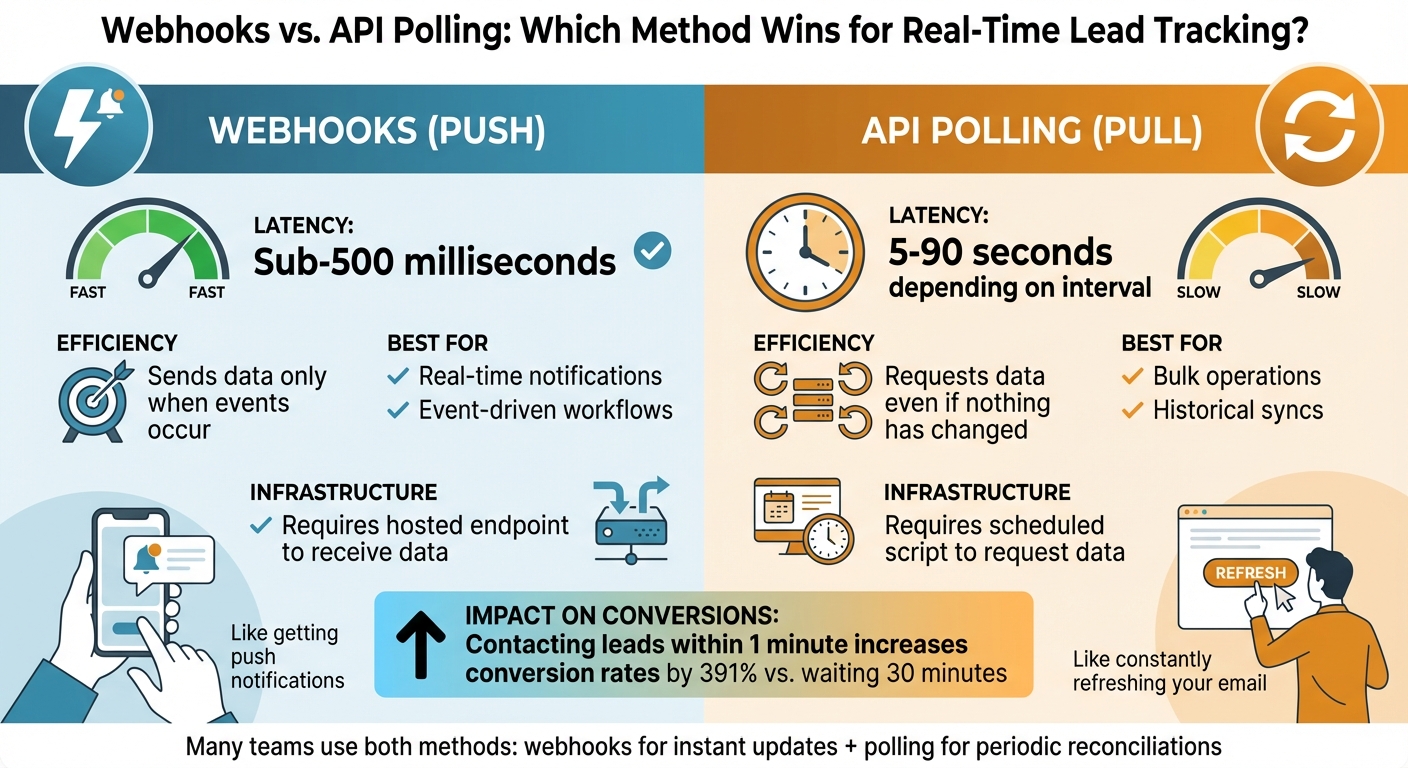
Webhooks vs API Polling: Speed and Efficiency Comparison for Real-Time Lead Tracking
Real-time data synchronization ensures that your CRM stays up-to-date instantly. APIs make this possible using two main approaches: webhooks (push notifications) and polling (pull requests). Knowing how these methods work can help you decide which best fits your lead tracking system.
Webhooks vs. Polling: Two Integration Methods
Webhooks act like push notifications for your database. They automatically send data from a source system to your CRM as soon as an event happens – like when someone submits a contact form. Once triggered, the source system sends the data to a preconfigured destination URL.
"Polling is like constantly refreshing your email. Webhooks are like getting push notifications."
– Jan, Databar.ai
Polling, in contrast, involves your CRM periodically checking an API for updates, such as every 60 seconds. This method inherently comes with delays. For instance, with a 60-second polling interval, data might take anywhere between 30 and 90 seconds to sync.
Webhooks deliver data in under 500 milliseconds, while even a fast polling interval (like 10 seconds) results in delays ranging from 5 to 15 seconds. In industries where speed matters, this difference is critical. For example, contacting a lead within one minute increases conversion rates by 391% compared to waiting thirty minutes.
| Feature | Webhooks (Push) | API Polling (Pull) |
|---|---|---|
| Latency | Sub-500 milliseconds | 5–90 seconds (depending on interval) |
| Efficiency | Sends data only when an event occurs | Requests data even if nothing has changed |
| Best For | Real-time notifications and event-driven workflows | Bulk operations or historical syncs |
| Infrastructure | Requires a hosted endpoint to receive data | Requires a scheduled script to request data |
Many teams combine both methods – using webhooks for instant updates and APIs for periodic reconciliations. Together, they provide a strong foundation for solving synchronization issues.
Eliminating Data Delays and Duplicates
Accurate, real-time data is essential for effective lead tracking. However, delays and duplicates can compromise data reliability. APIs help tackle these challenges, but each method has its quirks. For example, batch synchronizations can leave your team working with outdated data. Webhooks solve this by pushing updates instantly, but they can also fire multiple times if a network retry occurs.
To prevent duplicates, implement idempotency. This involves assigning unique IDs to leads or events so that if a webhook is retried, the system recognizes the duplicate and ignores it. This keeps your CRM clean and organized.
Additionally, asynchronous processing is key. When your CRM receives a webhook, it should immediately send back an HTTP 200 status code to confirm receipt. The actual data processing can then happen in the background. This avoids timeouts that might trigger retries and create duplicates. For more complex tasks – like enriching lead data from multiple providers – processing synchronously can lead to bottlenecks.
To handle high traffic without losing data, consider using a message queue between receiving the webhook and processing it. This acts as a buffer, ensuring no leads are missed during peak periods. Some teams also use waterfall enrichment, where the API sequentially queries multiple data providers. For example, if the first provider doesn’t have a phone number, the system automatically moves to the next. Advanced enrichment layers can process data from over 90 providers.
Lastly, secure your webhook endpoints with HTTPS and validate incoming data using HMAC signatures or API keys. Regularly track the time it takes from receiving a webhook to updating your CRM to ensure your synchronization process delivers on its promise of real-time updates.
Automating Lead Management with APIs
APIs streamline lead management by automating processes and triggering real-time actions whenever a lead’s status changes. This ensures CRMs always maintain accurate and actionable lead records, thanks to instant data synchronization.
Triggering Automated Workflows with Real-Time Events
When a lead-related event happens, webhooks can instantly activate automated workflows that enrich data and adjust routing rules. Here’s how it works: the webhook sends the lead data to an enrichment service, where an API fetches third-party information and updates the CRM in real time. This process fine-tunes lead scoring and routing without delay.
CRMs like HubSpot, Salesforce, Zoho, and Pipedrive come equipped with built-in webhook functionality through their automation tools.
Once the enriched data is fed back into the CRM, it can spark secondary workflows. These might include recalculating lead scores, applying territory-specific routing rules, or notifying assigned sales reps. To ensure no data is lost, dead letter queues can capture any failed records for manual review.
This seamless automation sets the stage for more advanced lead scoring and qualification processes.
Improving Lead Scoring and Qualification
APIs also enable dynamic lead scoring, recalculating scores instantly whenever new behavioral or firmographic data is added to a lead record. This real-time scoring helps sales teams prioritize high-intent leads without waiting for scheduled updates.
To further refine lead profiles, waterfall enrichment ensures completeness by querying multiple data providers sequentially. For instance, if one provider lacks specific details, the system automatically moves to the next. Some advanced enrichment layers can tap into over 90 data providers to append firmographic, contact, and intent data directly to CRM records.
Enriching CRM Lead Profiles with API Integration
Adding Third-Party and Backend Data
APIs make it possible to connect external databases with your CRM, transforming raw lead records into detailed, actionable profiles automatically. Instead of spending hours manually researching prospects, your system can pull in verified contact details and firmographic data on its own.
For example, in the real estate industry, Property Lookup APIs can confirm address details and add information like total building area, year built, or market value. Similarly, Skip Trace APIs can fill in missing owner contact details when all you have is an address or name. Tools like BatchData go even further, offering APIs for property searches, contact data enrichment, skip tracing, and phone verification. These services integrate directly with CRMs, ensuring lead profiles are as complete as possible.
This data integration happens seamlessly through bidirectional triggers, often powered by webhooks. These webhooks instantly activate external data enrichment, pulling in third-party information and updating CRM records in real time. This process avoids outdated data and ensures your sales team always has access to the latest information – limited only by API rate constraints.
Better Targeting and Personalization
With enriched lead profiles, your team gains the tools for sharper targeting and highly personalized outreach. This additional data gives sales and marketing teams the insight they need to craft tailored messaging without ever leaving the CRM. By syncing details like lead scores, campaign history, organizational data, and contact roles in the buying process, APIs enable reps to adapt their outreach based on real engagement patterns and firmographic alignment.
Take Salesforce’s Einstein AI, for instance. It uses integrated external data to predictively score leads based on historical trends, making it easier to prioritize high-potential prospects. Similarly, connecting marketing automation platforms like HubSpot via API allows for the automatic creation of scored leads enriched with notes and organizational details. These leads are then routed to the appropriate rep, complete with all relevant context. This level of automation reduces manual errors, speeds up response times, and improves conversion rates by enabling reps to address each prospect’s unique needs and challenges.
Maintaining Reliability and Security in API Integration
For real-time lead tracking to work effectively, ensuring reliable API performance and strong security is non-negotiable.
Monitoring API Performance and Latency
Keeping an eye on API performance is key to maintaining a smooth flow of lead data. Aim for 99.9% uptime, with read speeds under 200 ms, write speeds under 500 ms, and error rates below 1%. These benchmarks help catch issues like authentication failures or server errors before they escalate. Tools like Datadog or New Relic provide real-time dashboards, alerting your team to any unusual activity. For example, when fetching activity records (like calls or notes), using incremental filters such as updated_gte can drastically reduce duplicate detection time – from hours to minutes – helping to minimize latency. Live monitoring tools can also track requests end-to-end, making it easier to pinpoint problems like network delays, rate limits, or server-side issues.
To speed things up even more, implement caching for frequent reads (e.g., lead profiles). Meanwhile, ensure live writes – like updates to CRM data – go directly to the source. This approach can shrink delays from minutes to just seconds. While performance is critical, safeguarding real-time data with strong security measures is equally important.
Implementing Authentication and Data Security Protocols
Securing API connections is essential to protect sensitive lead data. OAuth 2.0 is a reliable choice, allowing delegated access without exposing user credentials. Combine this with short-lived Bearer tokens (valid for 15–60 minutes) that refresh automatically and can be revoked if compromised. Data should always be encrypted – use TLS 1.3 for data in transit and AES-256 for data at rest.
Request only the fields you actually need, like emails or phone numbers, to limit exposure of personally identifiable information (PII). Additional safeguards include rate limiting, IP whitelisting, and field filtering. Centralized authentication systems can also streamline security by offering unified control, audit logs, and automated updates. These measures ensure that your API integration stays secure without compromising performance.
Conclusion
API integration reshapes lead tracking by replacing tedious manual research with automated, real-time workflows. This shift allows sales and marketing teams to focus on engaging prospects at the right time, cutting out hours of manual data verification. As Parker Gawne, Founder of Syntora, aptly states: "A lead that has gone cold waiting for a sync is a lost opportunity".
The key advantages are clear: faster response times and smarter lead prioritization. Automated workflows ensure high-value leads are routed to the right team members without the need for manual intervention, boosting the chances of conversion.
To build on these benefits, teams can take small, strategic steps to turn insights into actions. Start with a pilot project aimed at improving one specific workflow or market. Add multi-channel alerts to enable instant notifications, and prioritize secure API practices by managing credentials and execution logs carefully. These incremental steps set the stage for future growth.
API integration also offers scalability. Businesses can expand into new markets or property types without significantly increasing their workload or team size. By automating tasks like lead generation, data enrichment, and market monitoring, organizations gain a competitive edge with timely alerts and proactive outreach. For real estate professionals, tools like BatchData – highlighted by Ivo Draginov (https://batchdata.io) – enhance CRM enrichment and real-time tracking, turning raw data into actionable revenue opportunities. The result? A streamlined, efficient operation that transforms data into action – and action into measurable results.
FAQs
When should I use webhooks vs. polling for lead sync?
Webhooks are your go-to tool when you need real-time updates with minimal lag. They instantly push data whenever an event happens – like a lead submission – making them perfect for immediate CRM updates and quick follow-ups. On the other hand, polling works by requesting data at set intervals. While it’s useful for tasks that aren’t time-sensitive, it comes with delays and can increase server strain. Use webhooks for critical, time-sensitive workflows, and save polling for simpler, less urgent needs.
How do I prevent duplicate leads from webhook retries?
To prevent duplicate leads caused by webhook retries, you can set up a deduplication layer. This involves using unique identifiers, such as external IDs, to filter out repeated records. Another key step is to validate webhook signatures on the server side. This ensures that only legitimate notifications are processed, adding an extra layer of security.
Additionally, make your system capable of handling idempotent operations. This means that if the same webhook call is received multiple times with identical data, it won’t create duplicate entries. By combining these techniques – deduplication, signature validation, and idempotency – you can effectively manage retries and avoid duplicate entries.
What’s the simplest secure setup for CRM API access?
For a straightforward and secure way to set up CRM API access, focus on using reliable authentication methods like OAuth 2.0, API keys, or JWT (JSON Web Tokens). Keep your credentials safe by storing them in secure locations, such as environment variables or secrets managers. Additionally, implement strict access controls to ensure your data remains protected.