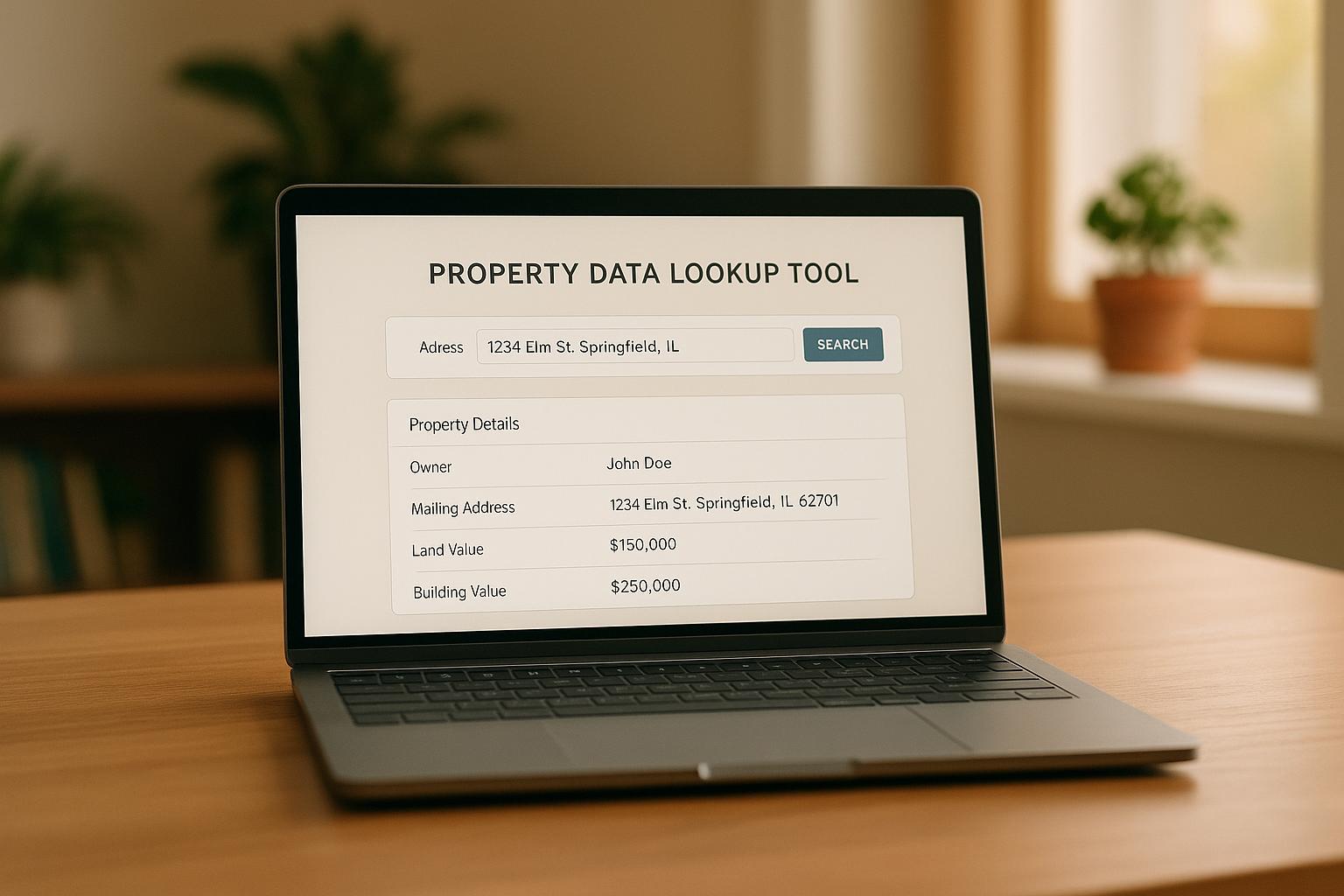
When contact data is scattered across tools like spreadsheets, email platforms, and lead portals, it leads to inefficiencies, errors, and missed opportunities. Integrating this data into a centralized CRM ensures organized records, better follow-ups, and improved client interactions.
Key Highlights:
- 18% more transactions for agents using well-maintained CRMs.
- Poor integration wastes 20–30% of time on manual data handling.
- Compliance issues, like violating TCPA, can lead to fines of up to $1,500 per violation.
Steps to Success:
- Prepare: List all data sources, standardize fields, and define goals.
- Clean Up: Remove duplicates, verify missing info, and apply consistent formatting.
- Integrate: Use APIs, CSV imports, or syncing tools for smooth data flow.
- Enrich Data: Add property insights, verify contact details, and automate updates.
- Maintain: Conduct regular audits, track workflows, and ensure compliance.
Clean, integrated data boosts segmentation accuracy, reduces errors, and enhances CRM performance. Follow these steps to turn your scattered contact data into a powerful tool for personalized outreach and smarter decisions.
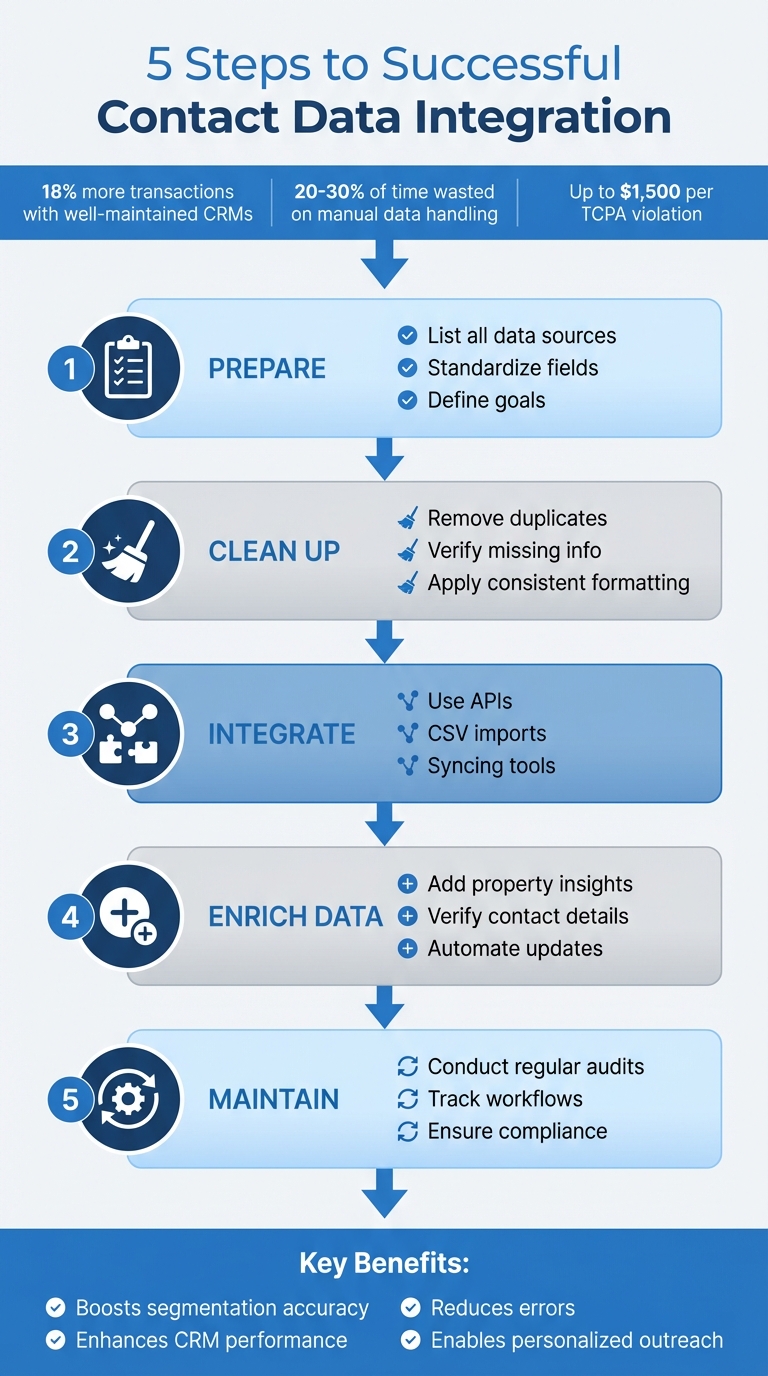
5-Step Contact Data Integration Process for Real Estate CRM
Preparation Checklist: Planning Your Contact Data Integration
List All Contact Data Sources
Start by identifying every tool or system where contact information is stored. This could include spreadsheets, lead portals, email platforms, MLS databases, transaction records, or communication apps. To stay organized, create a tracking table with columns for Tool, Data Type, and Sync Priority. This method ensures you won’t waste time chasing down scattered details across various platforms, reducing the risk of fragmented data.
Match Contact Fields to Your CRM Structure
Align your data fields with the structure of your CRM. Focus on key fields such as first and last name, phone number, email, address, property preferences, transaction history, and buyer/seller tags. Before importing, standardize formats – phone numbers should follow a consistent style, like (123) 456-7890, emails should be lowercase, and property preferences should map to custom CRM fields (e.g., Budget: $300,000-$500,000). Use a field mapping template to connect source data headers, like "Cell_Num", with the corresponding CRM fields, such as "Mobile Phone." This ensures data is correctly placed, making it searchable and ready for tasks like generating reports or sending personalized follow-ups.
Define Your Integration Goals
Clearly outline what you want to achieve with your data integration. Instead of just transferring data, focus on objectives that align with your sales workflow. For instance, automate follow-ups for viewed properties, use a contact enrichment API to fill in incomplete lead profiles, or improve segmentation by location or property interest. Use the SMART framework to set measurable goals, like reducing lead response time or ensuring full data synchronization within 24 hours. Keep in mind factors such as how quickly data needs to move (data velocity), the complexity of field mapping, and how well the system can scale as your database grows.
Review Compliance Requirements
Make sure your data integration complies with all relevant regulations. For example, the Telephone Consumer Protection Act (TCPA) prohibits unsolicited calls and texts to mobile phones without prior express written consent, with penalties reaching up to $1,500 per violation. To avoid issues, document consent fields in your CRM using opt-in checkboxes, audit your data sources for proof of permissions, and filter out non-compliant contacts. Additionally, follow CAN-SPAM guidelines for email communications and check for any applicable state-specific laws, such as those similar to the CCPA. Map consent tracking to CRM fields and log DNC scrubbing statuses to protect yourself from violations and maintain trust with your contacts. Once these steps are complete, you’ll be ready to clean and format your data for a seamless integration.
sbb-itb-8058745
Creating a Zapier Integration Made Simple: Integrating a Real Estate CRM with HighLevel

Data Quality Checklist: Cleaning and Formatting Contact Data
Once you’ve planned your integration, it’s time to focus on ensuring your contact data is both accurate and standardized. Clean, well-organized data is essential for smooth CRM integration and optimal performance.
Delete Duplicate and Incorrect Records
Start by defining what qualifies as a duplicate. This might include variations of emails, phone numbers, or names. Use your CRM’s deduplication tools to assign match scores across key fields. Begin with exact matches – like identical email addresses and phone numbers – then move on to fuzzy matching for entries with slight differences. Carefully review these matches and merge records, keeping the most complete and up-to-date information.
Look for anomalies such as text in numeric fields, unusual outliers, or excessive missing data. Remove outdated records or entries generated by bots. A Validity survey found that 70% of CRM managers believe employee turnover has negatively impacted data quality, with missing or incomplete data being the top issue hindering CRM effectiveness.
Verify and Add Missing Contact Information
Use tools like phone verification and address standardization services to fill in the blanks in your contact records. For example, BatchData’s phone verification can confirm whether mobile numbers are active and valid, reducing time wasted on ineffective follow-ups. Address standardization ensures locations match USPS formatting, making it easier to align contacts with property records and conduct location-based searches. To further enrich your data, connect your CRM to external services that can auto-populate missing fields – like property ownership details or contact preferences – when new leads come through web forms.
Apply Consistent Formatting Standards
Consistency is key. Standardize formats for phone numbers, dates (MM/DD/YYYY), and addresses using bulk find-and-replace tools and validation rules. Dropdown menus and predefined lists for fields like property types, lead sources, or geographic locations can help reduce manual errors. At the point of entry, enforce validation rules to ensure specific formats are followed and make key fields mandatory. As Joe Barron from Cognism explains, "Data governance is the foundation of CRM data cleanliness. It’s all about how your organisation manages the data it collects, stores, and uses".
Here’s a quick guide for how often to perform certain cleaning tasks:
| Cleaning Task | Recommended Frequency | Description |
|---|---|---|
| Deduplication & Validation | Ongoing / Automated | Real-time checks as data enters the CRM. |
| Database Audits | Quarterly | Identify new data quality issues and re-segment data. |
| Full Database Purge | Annually | Remove inactive contacts and review for compliance. |
Group Contacts by Category
After cleaning and standardizing your data, organize your contacts into meaningful categories. Segment them based on property interests, lead recency, transaction stage, or lead value. For example, tag buyers by their preferred property types (like single-family homes, condos, or investment properties), price ranges, and geographic preferences. Separate active leads from colder prospects, and flag high-value contacts who have completed transactions or shown strong buying intent. This segmentation enables more targeted email campaigns, automated follow-ups based on property viewing history, and sharper reporting insights to refine your sales approach.
Integration Setup Checklist: Connecting Your Systems
After organizing and cleaning your data, the next step is setting up a reliable integration to ensure smooth contact data flow into your CRM. This process connects your data sources to your CRM, enabling efficient data transfer and management.
Select Your Integration Method
There are three main methods for transferring contact data into your real estate CRM:
- APIs: These allow real-time synchronization, automatically updating records whenever changes occur in your source systems.
- CSV imports: Best for handling large volumes of historical data, making them ideal for one-time migrations or bulk updates from property databases.
- Email and calendar syncing: Captures communication logs automatically, ensuring all client interactions are recorded in your CRM without manual effort.
Statistics show that real estate agents using integrated platforms can grow up to 6x faster and close 3x more transaction volume compared to their peers. Advanced systems process over 700 million interactions and analyze 15 billion data points annually across hundreds of thousands of listings.
Once you’ve chosen your integration method, it’s important to establish clear field mappings and automation rules to ensure the data flows smoothly.
Set Up Field Mappings and Automation Rules
Start by auditing your CRM fields to eliminate duplicates and standardize naming conventions. For example, consistently use "Email" instead of mixing terms like "Email Address" or "E-mail." This prevents sync errors and keeps your data clean. Pay close attention to matching data types – fields like "Dropdown Select" should map to "Picklist", and "Single Checkbox" should align with "Boolean."
For real estate-specific data, map specialized fields such as Property Interest, Price Range, and MLS data like listing_price or property_status. For instance, in October 2025, Fuzen implemented an MLS integration workflow that mapped price to listing_price and status to property_status, enabling automated email notifications for clients when matching properties were listed. Similarly, in early 2026, Emergent Labs configured Slack alerts for high-value inquiries by mapping Lead Name, Contact Info, and Price Range, improving response times for properties valued over $2 million.
Decide if you need a One-Way Sync (data flows only from the source to the CRM) or a Two-Way Sync (updates in either system reflect in both). Implement trigger-based automation for specific events, such as new lead submissions, multiple property page views for the same listing, or MLS status changes from Active to Pending. These triggers ensure that critical actions, like follow-ups or notifications, happen automatically.
Test with Small Data Samples First
Before going live, test the integration with a small batch of 20–50 records. Choose a diverse sample that includes incomplete fields, multiple phone numbers, and a variety of property types. This ensures that data – whether it’s property APNs, owner phone numbers, or skip-traced information – maps correctly to your CRM.
Use a sandbox environment or test account to avoid impacting your live database. Run the test, inspect logs, and manually review record details to confirm everything aligns. Check the CRM’s import summary logs for skipped records or soft errors, and verify that deduplication rules function properly by merging existing contacts based on unique identifiers like email or phone number. For real estate, it’s especially important to ensure that "Mailing Address" and "Property Address" remain distinct to avoid errors in direct mail campaigns.
Enrichment Checklist: Improving Contact Data with BatchData
Once your contact data is part of your CRM, the next step is to take it a step further – enriching each record. This process transforms basic details, like names and addresses, into comprehensive profiles loaded with property insights, verified phone numbers, and ownership data. The result? More personalized outreach and smoother workflows.
Add Property and Contact Details
BatchData taps into a database of 155 million U.S. property records sourced from official channels. This means you can seamlessly fill in missing details in your CRM, such as mortgage balances, purchase dates, estimated equity, square footage, and even property features like the number of bedrooms or lot size. For example, knowing an owner’s equity position can help you tailor follow-ups for refinancing or home improvement opportunities. Agents leveraging enriched data have seen an 18% increase in transactions and up to a 22% boost from consistent, personalized follow-ups. Thanks to BatchData’s Property Intelligence API, this data integrates into your CRM in milliseconds via JSON responses – completely automating the process.
Use Skip Tracing and Phone Verification
Skip tracing is a powerful way to track down hard-to-reach leads by uncovering unlisted phone numbers, emails, and addresses. It’s especially helpful when public records only provide minimal information, like a name or an anonymous LLC. BatchData delivers 76% right-party contact accuracy, outperforming the industry average by three times. Phone verification adds another layer, confirming active numbers and flagging invalid ones, which ensures over 95% list accuracy and lowers bounce rates. Together, these tools can push outreach success rates from the usual 20-30% to over 60%, making targeted campaigns – like equity reports or neighborhood updates – far more effective. Plus, the platform automatically checks numbers against the National Do Not Call (DNC) Registry, keeping your outreach legally compliant.
Use APIs for Bulk Data Upload
BatchData’s APIs make it easy to securely upload large volumes of enriched data – think property details for thousands of contacts – straight into your CRM. This approach eliminates manual errors and cuts integration time by up to 80%. By obtaining BatchData API credentials, mapping fields (e.g., listing_price to price), and running small test batches, you can automate data syncing with confidence. The API supports more than 300 data points, including property age, lot size, construction details, and indicators of financial distress.
Chris Finck, Director of Product Management, shared: "What used to take 30 minutes now takes 30 seconds. BatchData makes our platform superhuman".
Create Custom Data Pipelines
If your business has unique needs, BatchData’s professional services team can create custom data pipelines tailored to your workflow. These pipelines can automate enrichment for specific segments, such as distressed properties identified through mortgage data, or even set up lead scoring based on owner motivation. Custom pipelines ensure compatibility with multiple tools, provide regular updates, and help you maximize ROI while keeping your data accurate.
Maintenance Checklist: Keeping Your Data Accurate
Even the cleanest database won’t stay pristine without regular upkeep. Contacts change jobs, phone numbers become outdated, and duplicate records sneak in. This is where the 1-10-100 rule comes into play: addressing a data issue upfront costs $1, fixing it early costs $10, and letting it spiral into costly errors can set you back $100. Routine maintenance safeguards your data investment and ensures your outreach campaigns stay on track.
Conduct Regular Data Reviews
Proactive reviews are essential to stop minor issues from snowballing into major problems. Plan monthly audits that combine automated checks with manual reviews. Designate a data steward to oversee key metrics like record completeness, duplicate rates, and overall accuracy. Make it a practice for team members to update records immediately after every customer interaction.
Ivan Karp, Managing Director at SyncMatters, highlights: "Maintaining accurate, current, and reliable customer records across all departments is ensured by routine CRM data verification".
Keep formatting consistent – like using "NY" instead of "New York" – to avoid complications in reporting.
Track Workflow Performance
Keep an eye on your system integrations to catch potential issues early. Start by setting a benchmark; for example, many marketers aim for 95% email validity as a healthy standard. Use tools like real-time validation at entry points – such as web forms or API integrations – to flag missing fields or invalid phone numbers as they’re entered. Weekly scans can help identify near-duplicates before they pile up.
As Validity explains: "Data quality monitoring isn’t just a one-time cleanup – it’s a continuous process… Think of it like a smoke alarm: always on, always warning you before a small issue becomes a full-blown campaign disaster".
Continuously Improve Your Processes
After your initial data cleanup, focus on fostering a data ownership culture. This means ensuring that everyone – whether in Sales, Marketing, Support, or Finance – understands how data quality directly impacts their goals. Standardize quality control across all data entry points and use dashboards to monitor trends over time. Share these insights with stakeholders to keep everyone aligned.
Ivan Karp adds: "Maintaining clean CRM data is a shared commitment across all departments, not just IT".
Finally, schedule regular training sessions to reinforce data entry standards and ensure everyone stays on the same page.
Compliance and Security Checklist: Protecting Contact Data
Protecting contact data isn’t just about keeping your CRM organized – it’s about safeguarding trust and avoiding hefty fines or reputational damage. Here’s how you can secure your contact data and ensure compliance with essential regulations.
Turn On Encryption and Access Controls
Encryption is your first line of defense. Make sure all contact data, whether stored or in transit, is encrypted to render it unreadable if intercepted. Implement role-based access so employees only see the data necessary for their role. Adding Two-Factor Authentication (2FA) for all users provides an extra layer of protection, even if passwords get compromised. For remote or mobile CRM access, require a Virtual Private Network (VPN) to keep connections secure. Once these controls are in place, actively monitor your system for breaches or suspicious activity.
Record Consent for Communications
Consent is non-negotiable. Use opt-in checkboxes in your CRM to document permissions, and audit your data sources to ensure you have proof of consent. Keep in mind that the Telephone Consumer Protection Act (TCPA) prohibits unsolicited calls and texts to mobile phones without prior written consent, with penalties reaching up to $1,500 per violation. For email communications, adhere to CAN-SPAM guidelines and review any state-specific laws that may apply. Track consent statuses in your CRM fields and maintain an updated Do Not Call list to avoid violations and build trust with your contacts.
Watch for Security Breaches
Stay vigilant by using activity tracking and audit logs to spot unauthorized access, such as unfamiliar IP logins or mass downloads of data. Make it a habit to review these logs weekly and set up real-time alerts for high-risk actions like bulk exports or sharing entire contact lists. Limit these capabilities to senior staff only. Regularly train your team to recognize phishing attempts and suspicious links. Check with your CRM provider about their breach protocols and clarify where your data is hosted to ensure everyone’s responsibilities are clearly defined.
Conclusion
Use our checklists to transform scattered contact data into a powerful tool for personalized outreach, automated follow-ups, and smarter decision-making.
By following the steps outlined, clean and integrated data can lead to noticeable improvements. For example, clean data enhances segmentation accuracy by 25%, supports real-time syncing in less than five minutes, and helps achieve 100% complete contacts within a focused 30-day CRM cleanup plan. Additionally, personalized emails can deliver 14% higher click-through rates, turning your database into a revenue-generating asset.
BatchData simplifies this process with tools designed for data enrichment and seamless integration. Their services include property and contact enrichment, skip tracing, phone verification, and APIs for bulk uploads – all while adhering to TCPA and compliance requirements. Custom data pipelines ensure your CRM stays accurate and ready for action, reducing the risks of manual data entry.
FAQs
Which data sources should I integrate into my real estate CRM first?
To build a solid foundation for your outreach efforts, start by integrating data sources that offer precise, verified contact information and detailed property records. Look for APIs that specialize in skip tracing and bulk data processing for property owners. Complement these with resources like county records, assessor data, and USPS address verification tools. Together, these sources help confirm ownership, validate addresses, and ensure your outreach aligns with industry standards.
What’s the best unique identifier to prevent duplicate contacts during syncs?
When it comes to avoiding duplicate contacts during syncs, the most reliable identifier is usually a property owner’s ID or a verified contact detail, such as an email address or phone number. Verified information ensures greater accuracy, reducing the risk of errors. To handle this efficiently on a larger scale, tools like APIs can assist with data enrichment and verification, simplifying integration while preserving the integrity of your data.
How do I track TCPA consent and Do Not Call status inside my CRM?
To manage TCPA consent and Do Not Call (DNC) status within your CRM, it’s crucial to use tools that can verify and document consumer permissions effectively. Leverage APIs to automate compliance checks, allowing you to validate phone numbers and contact preferences in real time. Make it a habit to regularly update and audit your records to stay compliant. Additionally, integrate DNC list checks during lead capture or when updating contact information to ensure your data is accurate and avoid reaching out to individuals on restricted lists.