
If your team uses different names, formulas, or lookup values for the same field, your reports, feeds, and workflow logic will drift. My takeaway is simple: build one shared field list, tie it to RESO names where possible, assign an owner for each domain, and record source, format, rules, and formulas for every field.
Here’s the short version:
- I start with a small scope: property, member/office, financial/tax, transaction, and location
- I use RESO field names instead of local aliases when a standard field already exists
- I document the basics for each field: name, meaning, type, format, allowed values, unit, source, and validation
- I separate raw fields from calculated metrics like
CapRate - I record system mapping details, refresh timing, and
ModificationTimestamp - I assign one steward per domain and require review before any new field goes live
A few numbers show the scale: the RESO Data Dictionary includes 1,700+ fields and 3,100+ lookups, while RESO Data Dictionary 2.1 covers 44 resources and 2,167 fields. Most teams will use only part of that, which is normal.
What matters most is not building a giant document. It’s building a field guide your team will use for MLS feeds, CRM data, underwriting, compliance, enrichment, and reporting.
Data Dictionary Workgroup – RESO 2024 Spring
Quick overview
| Area | What I include |
|---|---|
| Scope | Only fields tied to revenue, daily work, and compliance |
| Standards | RESO names, U.S. date/phone/number formats, fixed lookup values |
| Field metadata | Definition, type, format, source, unit, validation, allowed values |
| Calculations | Written formulas for derived metrics like NOI and cap rate |
| Mapping | Source system, aliases, flatten/expand notes, lookup mapping |
| Governance | Domain stewards, approval process, version history |
| Maintenance | Quarterly or twice-yearly review, plus updates for schema changes |
If I had to reduce the article to one rule, it would be this: no new field should enter a system, report, or real estate API without a documented dictionary entry first.
Set Scope, Standards, and Ownership
Starting with every field your organization has ever used is the fastest way to build a data dictionary that stalls out halfway. Version one should cover only the data that directly affects revenue, daily operations, and compliance. Then you can grow it from there.
Define the Core Data Domains
Organize your dictionary by data domains, which are the main groups of related fields. For version one, stick with the core domains and the fields your team uses most:
| Data Domain | Core Fields | Purpose |
|---|---|---|
| Property | ListPrice, StandardStatus, LivingArea, LotSizeAcres |
Revenue and operations |
| Member / Office | MemberName, OfficeName, MemberStateLicense |
Operations and compliance |
| Financial / Tax | TaxAnnualAmount, AssessedValue, TaxStatusCurrent |
Compliance and underwriting |
| Transaction | ClosePrice, CloseDate, ListingContractDate |
Revenue tracking |
| Location | PostalCode, StateOrProvince, City, Latitude, Longitude |
Operations and GIS |
If photos or videos matter to your workflow, include the Media domain in version one too.
Use RESO as the naming model, but only bring in the domains your business needs right now. RESO lets you leave out unused fields, which helps version one stay tight and usable. In plain English: keep the scope tied to the fields your team works with every day.
Next, lock those domains to RESO field names and U.S. formatting rules.
Align Fields to RESO and U.S. Formatting Rules
Once you know which domains belong in scope, set naming and format rules before anyone starts writing definitions. Use RESO-standard field names wherever they exist. That means ListPrice instead of AskingPrice, and MemberKey instead of Agent ID.
For formatting and data types, use the same rules across the board:
- Dates:
Edm.Datefor date values andEdm.DateTimeOffsetfor timestamps - Phone numbers:
###-###-####for North American 10-digit numbers - Boolean fields: use the
YNsuffix convention and map them toEdm.Bool - Financial and numeric fields: use
Edm.DecimalorEdm.Doublefor values likeCapRate,GrossIncome, andOperatingExpense - Lot size and units: keep
LotSizeAcres,LotSizeArea, andLotSizeUnitsin sync so values stay consistent - Location fields: group address, area, GIS, and school data the same way every time
This kind of consistency saves a lot of cleanup later. If one system says AskingPrice and another says ListPrice, people waste time arguing over whether those fields match. Better to settle that up front.
Assign Data Stewards and Governance Rules
A dictionary stays useful only when someone owns it. Assign one steward per domain, define approval steps in a written review process, and document how local fields are proposed, reviewed, and versioned. As systems change, those owners keep definitions, values, and exceptions lined up.
Local fields are fine when the business has a specific need. But they shouldn’t duplicate a RESO field or conflict with one.
With scope and ownership in place, the next step is to inventory every system, report, and API that feeds these fields.
Build the Dictionary Step by Step
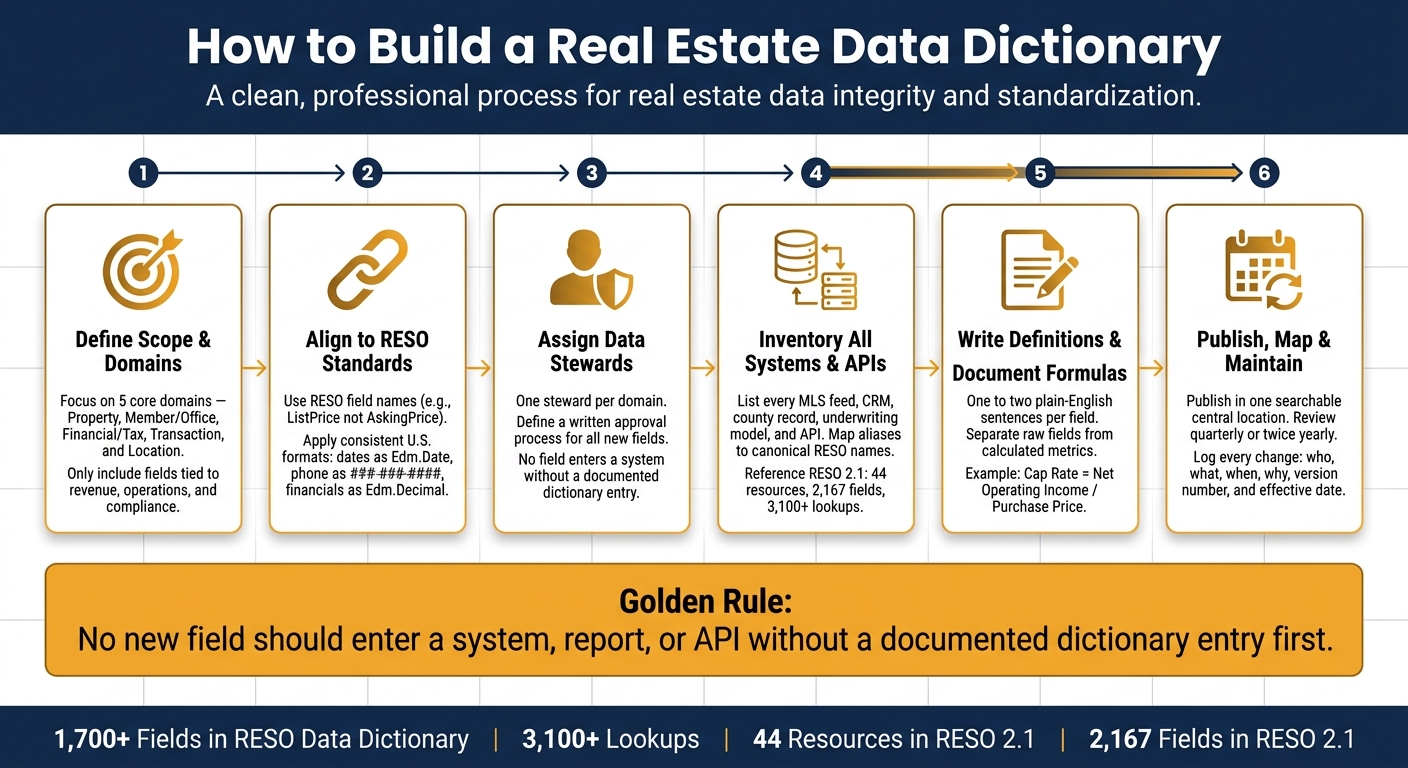
How to Build a Real Estate Data Dictionary: Step-by-Step Guide
Inventory Systems, Reports, and APIs
Start by listing every system that creates or uses real estate data. That includes MLS/RESO feeds, CRMs, county public records, underwriting models, spreadsheets, reports, and any APIs your team relies on day to day.
The biggest headache at this stage is concept duplication. The same data point often shows up under different names in different systems. Write down every alias you find. That list gives you the raw input for your canonical field names.
Use the RESO Data Dictionary spreadsheet as your starting checklist. RESO Data Dictionary 2.1 covers 44 resources and 2,167 fields. It also includes more than 3,100 lookups. Match your fields to those standard names and core resources like Property, Member, Office, Media, and Contacts. Flag anything that doesn’t line up, and note whether a field is flattened or expanded. That detail matters later when you document the source of truth.
Write Clear Definitions and Document Formulas
Once your field inventory is done, write a plain-English definition for every field. Keep it short – one or two sentences is enough. If someone outside your team can’t read it and instantly get what the field means and how it’s used, tighten it up.
One distinction needs to be crystal clear: raw fields vs. calculated metrics. Raw fields come straight from a source system. Calculated metrics are derived from other fields. For investment-focused teams, write down the exact formula for each derived metric so nobody does the math differently.
For example, Cap Rate should be defined as NetOperatingIncome / PurchasePrice. And Net Operating Income (NOI) is already a standard field with a 61% usage rate in the industry’s common data model.
Standardize Names, Values, and Rollout Plan
After the definitions are set, lock in naming conventions and lookup values before you publish anything. For field names, use RESO names wherever they exist. For lookup values, swap free-text fields for controlled lists when you can. ConstructionMaterials, for instance, should use defined values instead of open text.
Then publish the finished dictionary in one searchable, central place, like a wiki or shared spreadsheet that every team can access. That way, it works as the single source of truth for developers and analysts.
"There also may be benefits to using Data Dictionary standard names and values in the UI, since it provides consistency between what goes in and out of the system." – Sam DeBord, CEO, RESO
Document Enrichment, Integrations, and How the Dictionary Gets Used
After you publish names and definitions, add the operational metadata that keeps the dictionary usable in live systems.
Add Source, Latency, and Mapping Details for Every Field
Once field definitions are locked, document each field’s source system, refresh cadence, lookup mapping, and ModificationTimestamp. That way, teams can see where a value came from, how current it is, and when it last changed.
For measurement fields, include the source field right in the dictionary. For example, the RESO standard uses companion source fields such as AboveGradeFinishedAreaSource, with values like Agent, Assessor, or Estimate. That makes the origin of the value clear.
Enrichment fields need the same level of care, especially when they come in through batch or API delivery.
Track Enriched Property and Contact Fields from BatchData
Enriched property and contact fields need the same level of documentation. When data comes from BatchData – through enrichment, skip tracing, verification, or bulk delivery – record the field type, source, match logic, verification status, confidence score, and standard mapping.
For enriched fields, document:
| Metadata Field | What It Captures |
|---|---|
LookupName |
The name of the enumeration, such as StandardStatus. |
LookupValue |
Displayed value used in queries and payloads. |
StandardLookupValue |
Standard value the entry maps to. |
LegacyODataValue |
Legacy identifier for the same value. |
ModificationTimestamp |
When the enrichment or enumeration value was last modified. |
For verification fields, use Edm.Boolean for flags and Edm.DateTimeOffset for verification timestamps. Also document the validation rules that govern each field. If a team sees a verification flag, they should know exactly what triggered it and what date marks the last check.
"The point of the RESO Data Dictionary is to give data consumers and producers a common language to exchange data with." – Joshua Darnell, RESO
Connect the Dictionary to Underwriting, CRM, and Compliance Workflows
Once each field is documented, the dictionary can drive downstream underwriting, CRM, and compliance checks. Tie the dictionary to the workflows that use it. If a field or lookup changes, downstream systems can use the ModificationTimestamp to refresh only changed records. That’s especially helpful for underwriting, lead routing, and valuation workflows that rely on standardized values and consistent validation rules.
Compliance teams get the same advantage. When field definitions, validation rules, and allowed values live in one place, users can tell which records are ready for outreach and which ones need review before they move into an automated workflow.
"Standardized data allows tools to work together more accurately… Technology built on a common standard saves time and money via speed while creating more insightful data." – RESO Staff
This keeps the dictionary active in daily workflows.
Conclusion: Publish, Maintain, and Keep It Useful
After you build the dictionary, publish it where teams already work. Then link to it from CRM, underwriting, analytics, and data request workflows. If people can’t find it, they won’t use it. Once teams know where it lives, the next job is simple: keep it current.
Data stewards should own each review cycle. Review core domains every quarter or twice a year. Update the dictionary right away when you add new fields, change a schema, bring in a new enrichment source, or face a new rule. Record who changed what, when they changed it, why they changed it, which systems were affected, the version number, and the effective date. That’s where version control and field priority come in.
When field names line up with RESO standards from day one, integration work usually takes fewer mapping rounds. You also get fewer nulls, fewer invalid values, and faster onboarding for new feeds or vendors. For enriched fields from BatchData, record the source, latency, update frequency, and confidence.
Implementation Priorities
Start with the domains that matter most first. Put your attention on the areas tied closest to risk and revenue: property attributes, pricing and valuation, lead and contact data, and loan or deal status. These areas tend to produce quick wins and help teams trust the dictionary before you move into lower-priority fields.
There should be no net new field without a defined, documented, and approved entry in the dictionary. Write the definition in plain English first. Then add the technical detail. If a formula is involved, show it with real U.S. examples – currency in USD ($), dates in MM/DD/YYYY, and measurements in square feet – so users can see exactly how the metric works in practice.
The dictionary only stays useful when every new field goes through it first. Publish it. Review it. Require every new field to match it.
FAQs
What should I include in version one?
Start with a structure that matches how real estate deals happen in day-to-day work. In most setups, that means building around core resources like Property, Member, Office, and Media first. From there, define the fields that matter most to your workflow, such as listing status, price, address, agent details, and asset links.
For each field, use a standard data type like number, string, boolean, or date. That keeps your schema clean and makes it much easier to sort, filter, sync, and report on your data later.
It also helps to set validation rules for each field so bad data doesn’t slip in. For example:
- Use number for fields like list price, square footage, or bedrooms
- Use string for names, IDs, descriptions, and addresses
- Use boolean for yes/no values like active status or featured listing
- Use date for list dates, closing dates, or update timestamps
Then add rules such as required fields, min/max values, allowed formats, and length limits. A price field, for instance, might be required and limited to values above $0. An email field under Member might need to match a valid email format. Small checks like these save a lot of cleanup later.
When should I use a local field instead of a RESO field?
Use a local field only when no standard RESO field fits a regional need or a property detail that falls outside the usual set.
If a standard RESO data element already exists, use that instead so your data works well across systems. Local fields are still useful for special cases, like zoning laws, water rights, or unusual HOA rules. The key is to document them clearly and keep the structure consistent.
How often should a real estate data dictionary be updated?
Update your real estate data dictionary on a regular basis so it stays in step with changing industry standards, including those from RESO. How often you do this should match the amount of data your team handles.
For most teams, a monthly or quarterly review works well. That cadence helps you keep data consistent, spot gaps, and stop errors before they move through your data pipelines. BatchData can automate parts of the process, which makes it easier to keep records accurate and ready to use.