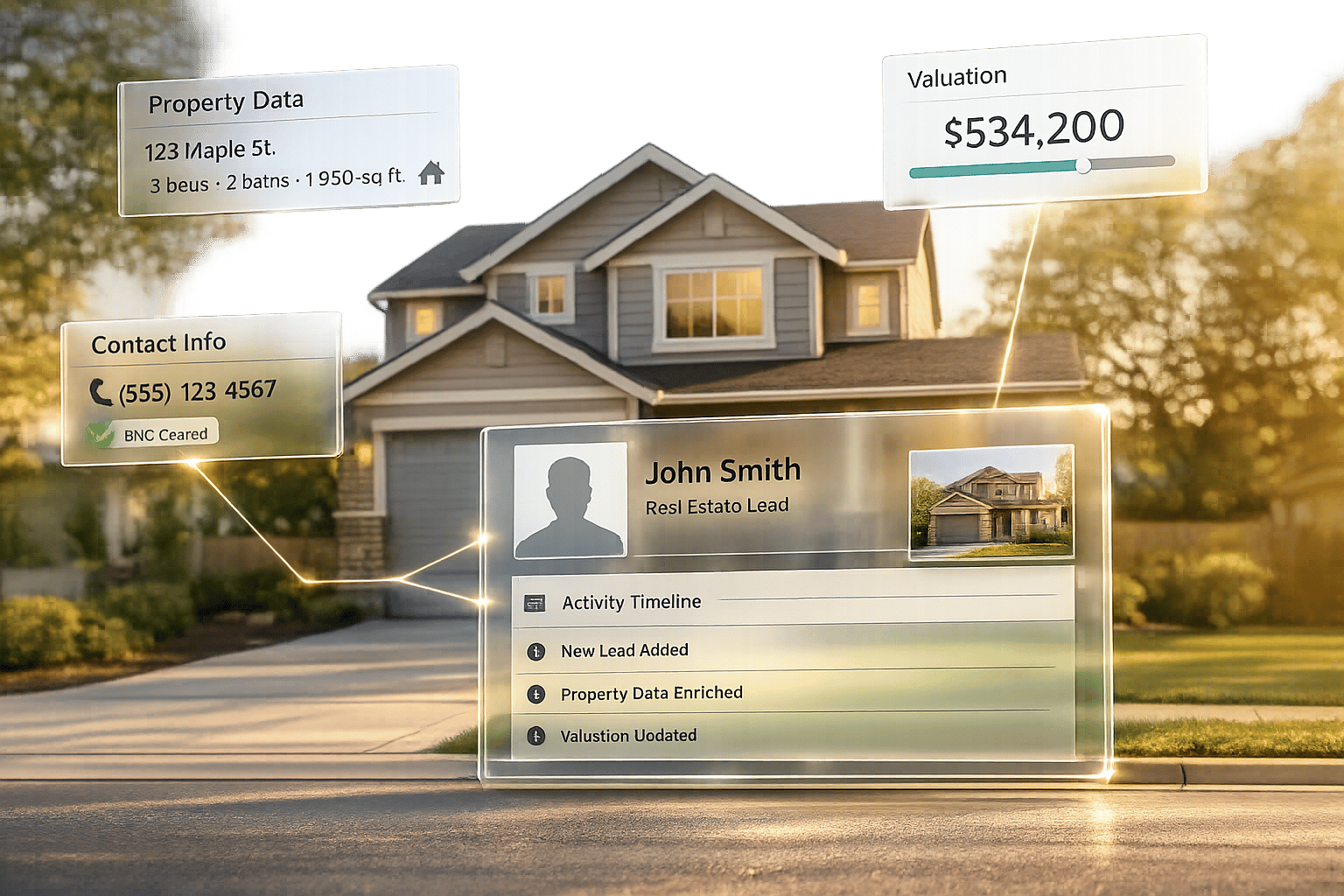
If your CRM automation is not built on clean data, secure API rules, and the right timing model, it will fail when lead volume goes up.
I’d sum the article up like this: set clear goals, normalize data before it hits the CRM, lock down API access, test failure paths, clean and verify records, and use real-time only where speed affects conversion. In U.S. real estate, that matters because leads can arrive 24/7, duplicate records can cut response speed, and even a small delay can cost deals.
Here’s the short version:
- Start with business goals and KPIs, not just record syncing
- Map every source field to one internal schema
- Use least-privilege access, OAuth 2.0, and signed webhook checks
- Make workflows idempotent so duplicate events do not create duplicate records
- Test
429and500errors and use retry logic with backoff - Send failed events to a DLQ instead of letting them disappear
- Normalize phone, email, price, and status fields at intake
- Enrich missing data on demand, not across the whole database
- Use real-time for lead routing and batch for high-volume jobs
A few numbers stand out. Buyers often expect a reply in minutes, not days. Webhook handlers should return 200 OK in under 5 seconds. And backup pollers can check for missed records every 5 to 60 minutes.
| Area | Main point | What I’d watch |
|---|---|---|
| Goals | Tie each workflow to a KPI | Duplicate rate, lead loss, manual work time |
| Data | Normalize before CRM write | Phone, email, price, status, mls_id |
| Security | Lock down API access | Service accounts, secrets, HMAC checks |
| Reliability | Build for retries and replay | Idempotency, backoff, DLQ |
| Data quality | Keep records clean over time | Nightly dedupe, phone verification |
| Timing | Match speed to job type | Real-time for routing, batch for enrichment |
If I were building this from scratch, I’d fix lead intake first, because that is where bad formatting, duplicate contacts, and routing mistakes usually begin.
Best Practice 1: Define Clear Automation Goals and Real Estate Use Cases
Before you build anything, get clear on the business result you want. Then pin down the lead intake, enrichment, or routing workflow that needs work.
A lot of teams jump straight to moving records from one system to another. That’s usually where trouble starts. In most cases, clean data, error handling, and duplicate prevention matter more than simple record transfer. Use one internal format for contacts and properties, then run a duplicate check before you create a new record. That way, a workflow can run twice without making a mess, and you cut down on conflicting drip campaigns. It all starts with how leads and property records come into the system.
To keep goals tied to business results, match each one to a KPI before development begins:
| Goal Category | Specific Objective | Success KPI |
|---|---|---|
| Data Quality | Normalize phone/email formats across all lead sources | % reduction in duplicate contact records |
| Efficiency | Automate property data enrichment (schools, taxes, owner history) | Reduction in manual research time |
| Reliability | Implement retry mechanisms with exponential backoff | API success rate and leads lost to server errors |
| Growth | Scale clean lead ingestion from MLS feeds | Total volume of clean, actionable records injected into CRM |
Once those goals are set, map fields cleanly across systems. Start with lead intake first, because messy website forms and lead-source formats tend to create the most duplicates and routing mistakes. When that path is stable, move into enrichment and the rest of your workflows.
Next, map each CRM field to a single source of truth.
Best Practice 2: Build Solid Data Models and Field Mapping Across Systems
Once your goals are clear, the next job is making sure data looks the same no matter where it comes from. In U.S. real estate, records often flow in from MLS feeds, lead forms, and marketing tools. The problem? Each source tends to use its own field names, formats, and rules. So before your CRM writes anything, every source needs to map to one internal schema.
The fix is a normalization layer. Think of it as a checkpoint between your data sources and the CRM. Before any record gets in, this layer forces the data into one shared structure. Phone numbers become 10-digit strings with no dashes or spaces. Email addresses get trimmed and lowercased. Property prices get converted to integers. That step keeps matching and deduplication steady instead of messy.
Field naming mismatches can cause just as much trouble. One MLS board might use ListPrice, while a lead portal uses current_price. If you don’t have a mapping dictionary that sends both into your internal price field, automations can break or write blanks. Here’s what that looks like:
| Internal Schema Field | Source A (MLS Board) | Source B (Lead Portal) | Standardization Action |
|---|---|---|---|
mls_id |
ListingId |
MLSNumber |
Primary key |
price |
ListPrice |
current_price |
Convert to integer |
status |
ListingStatus |
property_status |
Map to internal picklist |
phone |
123-4567 |
555.123.4567 |
Strip non-digits to 10-digit string |
email |
Lead@GMAIL.com |
LEAD@gmail.com |
Lowercase and trim |
Don’t stop with the core fields. Standardize enrichment data too, like geocodes, parcel IDs, tax assessments, and school ratings. When those fields follow the same internal model, it’s much easier to keep property profiles in sync across systems.
For contacts, use normalized email or phone values as your unique identifiers. For property records, use mls_id. Search first. If there’s a match, update it. Only create a new record when no match exists. That kind of stable schema also makes secure API integration much easier.
Best Practice 3: Use Secure and Scalable API Integration Architecture
Once fields are mapped, the next job is to protect the API layer moving that data around. A neat data model won’t help much if the integration layer is weak or easy to break. Real estate CRMs hold sensitive client, property, and transaction data, so security and scale need to be part of the setup from day one. The goal here is simple: keep clean data from turning into a new risk.
Lock Down Access at Every Layer
Don’t run automations through a real employee account. Create a dedicated integration user instead – a non-human service account – and apply the principle of least privilege so it gets only the access needed for that one job. If an API key gets exposed, that setup keeps the damage contained to the automation tied to it.
Use OAuth 2.0 client credentials for server-to-server calls, and keep API keys and tokens in a secret manager so they never show up in logs, config files, or workflow exports.
Every inbound payload should be checked before it touches the CRM. Verify webhook HMAC signatures from the raw request body, and reject malformed payloads before any CRM write happens. Also, make handlers idempotent. Duplicate webhook deliveries are normal, and your system should treat them that way instead of creating duplicate records or repeated updates.
Design for Scale Before You Need It
Once security is handled, volume usually becomes the next thing that breaks. Use Bulk APIs for large imports and updates, and keep single-record endpoints for small actions where low latency matters.
For real-time flows, pass heavy webhook payloads to an internal queue right away and return a 200 OK within 5 seconds. Then process the work asynchronously. That small move can save you a lot of pain when traffic spikes.
When rate limits or outages hit – and they will – use exponential backoff with jitter. A simple pattern might look like 1s, 4s, 16s, 64s, and 256s before sending failed requests to a dead-letter queue (DLQ) for manual review. Silent failures are where data drift starts, and that’s the kind of problem that creeps up on you.
It also helps to log every write, update, and delete event in structured JSON. Include the timestamp, record ID, workflow name, and API error code. When something goes wrong, those details make troubleshooting far less painful.
Best Practice 4: Test, Monitor, and Handle Errors in CRM Automations
Even a secure, well-mapped integration can break once it hits production. Timeouts happen. Webhooks get dropped. Leads slip through the cracks. That’s why testing and monitoring need to be built in from the start, not added later. Once your integration is secure and your field mapping is done, the next job is simple: make sure it can recover when something goes wrong.
Test Before You Go Live
Before launch, replay each webhook twice and make sure one payload leads to one record, one update, or one task. If the same event fires again, your system should not create duplicates.
You also need to test unique-identifier matching. That way, existing contacts get updated instead of being created all over again.
Push hard on your validation layer too. Malformed payloads should be rejected before they reach the CRM. Clean up whitespace and casing during normalization so messy input doesn’t turn into messy CRM data.
It’s also smart to test failure responses on purpose. Send HTTP 429 and 500 errors through the flow and confirm the system retries with exponential backoff instead of failing right away.
Monitor What Actually Matters
Testing tells you the workflow works. Monitoring tells you it’s still working a week later.
Don’t rely on the CRM alone for visibility. Send structured JSON logs to an external service like Datadog or New Relic. Those logs should include:
- timestamp
- record ID
- process name
- error message
Set up heartbeat alerts for missed runs too. If a process stops firing, you want to know fast.
It also helps to track each lead across the full flow, not just the final result:
RECEIVED→NORMALIZED→CRM_CREATED→EMAIL_SENT→TASK_CREATED
That trail makes troubleshooting much easier when something breaks in the middle.
Build a Safety Net for Failures
Retries help, but they won’t catch everything. Some payloads will still fail after every retry attempt.
When that happens, send exhausted payloads to a DLQ. That gives your team a place to review missed leads, updates, and tasks, then reprocess them without digging through scattered logs.
It also helps to run a backup poller as a fallback to webhook delivery. Have it check for missed records every 5 to 60 minutes. If a webhook never arrives, the poller gives you another shot at catching the record before it turns into a lost lead.
Best Practice 5: Start with Clean, Enriched, and Verified Data
Once transport is stable, the next place things tend to break is data quality. Retries and DLQs can recover failed calls, but they won’t fix bad source data.
In real estate workflows, leads often come from several places: Zillow, website forms, and manual entry. Each source has its own formatting habits. A phone number entered as 555.867.5309 in one portal and (555) 867-5309 in another may look like two different contacts to your automation, which can create duplicate lead records.
Normalize Data Before It Reaches the CRM
The fix is a normalization layer between the data source and the CRM. Before any record hits the CRM API, run it through a function that:
- strips non-numeric characters from phone numbers
- lowercases and trims email addresses
- standardizes name casing
This kind of standardization makes exact-match dedupe work.
You can use a schema validation library like Pydantic to enforce these rules at the entry point. If a payload is missing a key identifier, like an email address or phone number, reject it before it reaches the CRM.
Put together, normalization, enrichment, and verification act as one data-quality pipeline. The goal is simple: keep records dependable from intake through the full contact lifecycle.
Enrich on Demand, Not in Bulk
When property or owner details are missing, enrichment can help fill the gap. But bulk enrichment can cause a different problem: it may replace accurate user-submitted data with old third-party data.
A safer move is on-demand enrichment. Trigger it only when a record is missing a required field. Then store the result in a parallel field instead of overwriting the original. That gives you a clean paper trail. You can always see what came from the source and what came from enrichment.
For property enrichment, skip tracing, phone verification, address verification, and bulk data delivery, BatchData provides APIs built for these workflows.
Keep Records Accurate Over Time
Clean data doesn’t stay clean on its own. Data decays, so accuracy needs active upkeep.
A nightly dedupe job with fuzzy matching can catch near-duplicates, like small variations in a property owner’s name or company. It’s also smart to pair that with periodic phone verification so your CRM doesn’t slowly fill with inactive contacts.
Once your records stay clean, the next decision is whether each workflow should run in real time or in batches.
Best Practice 6: Match Real-Time or Batch Automation to Each Workflow’s Needs
Once your data is clean and your integrations are stable, the next step is simple: pick the timing model that fits the job.
Not every workflow needs instant data. Real-time processing costs more and can drive up API usage, so it makes sense to use it only when a delay would hurt results. If speed matters but a few minutes won’t change much, near-real-time is often enough.
Real-Time for Lead Routing, Batch for High-Volume Tasks
For lead routing and assignment, real time is non-negotiable. Webhooks are the right fit because they send data the moment an event happens. That lets your CRM assign the lead while the prospect is still paying attention.
For jobs like bulk property data enrichment, marketing list refreshes, or nightly reporting, batch processing is the better choice. It works well for high-volume workflows that don’t need an instant response.
The goal is to match each workflow to the lightest setup that still does the job.
Workflow Timing Guide
| Workflow Type | Best Model | Why |
|---|---|---|
| Lead routing & assignment | Real-time (webhooks) | Fast follow-up improves conversion |
| Bulk property data enrichment | Batch | Built for high volume |
| Marketing list refreshes | Batch | Keeps API usage low |
| Historical property data sync | Batch | Fits large back-office updates |
| Analytics & reporting | Batch | Matches reporting cadence |
A Practical Hybrid Setup
Most real estate teams use both models inside the same CRM. For example, a webhook can fire the second a new lead submits a form and route that lead straight to the right agent. Then, overnight, a batch job can handle verification and enrichment at scale.
That kind of split just makes sense: instant action where timing affects conversion, batch processing where volume matters more.
Real-Time, Near-Real-Time, and Batch Automation: A Side-by-Side Comparison
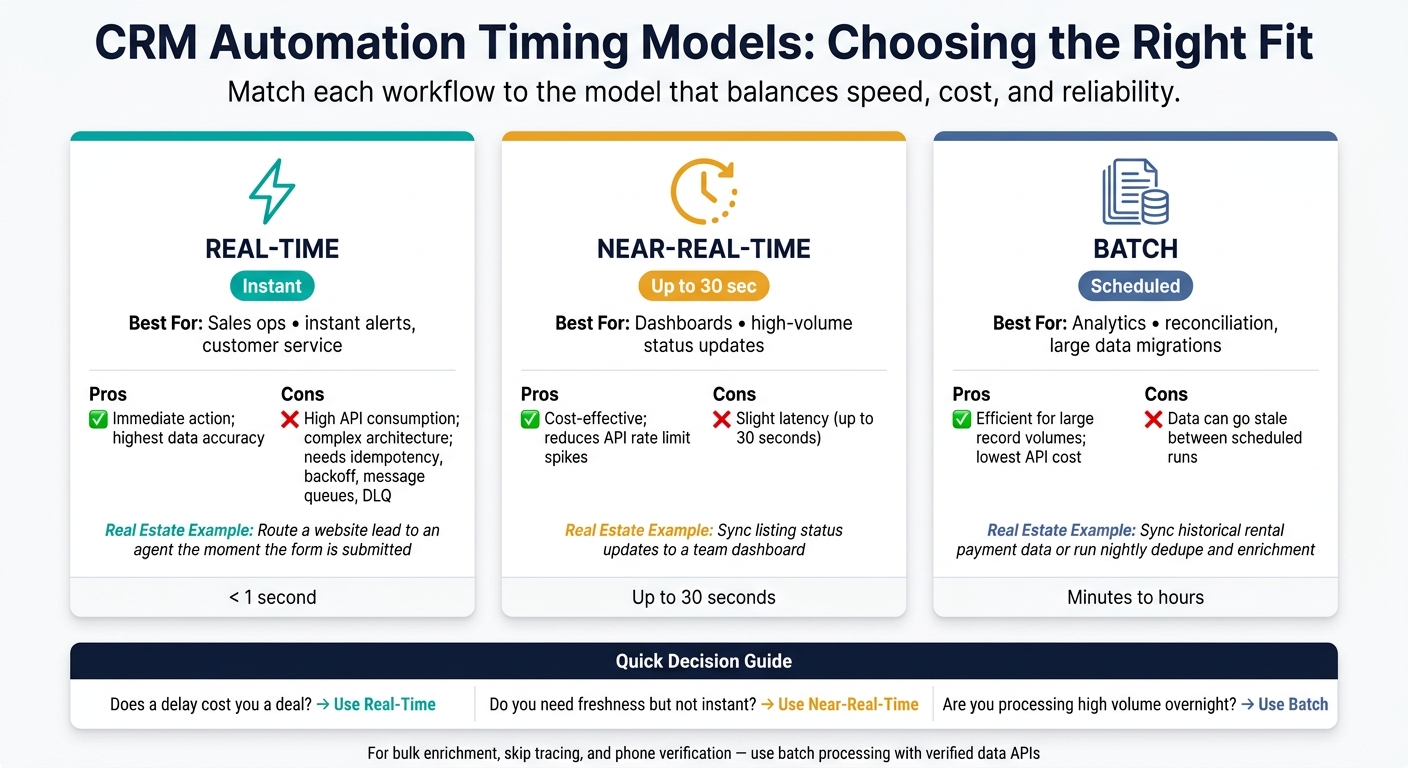
Real-Time vs. Near-Real-Time vs. Batch CRM Automation: Which Model Fits Your Workflow?
The previous section explained when each timing model makes sense. This comparison helps you pick the right one based on latency, volume, and how much failure your process can handle.
At a high level, these three models split apart on two things: speed and processing cost. From there, the trade-offs show up in API load, cost, reliability, and data freshness.
Real-time integrations make continuous API calls. That means they can hit rate limits fast, so you need solid error handling in place, including idempotency, exponential backoff, message queues, and dead-letter queues. Batch jobs work differently. They lean on bulk endpoints, which keeps API usage lower and makes failed runs much easier to rerun. The downside is simple: data can go stale between scheduled runs.
Here’s how the three models compare across the factors that matter most in CRM automation.
| Automation Type | Best For | Pros | Cons | Real Estate Examples |
|---|---|---|---|---|
| Real-Time | Sales ops, instant alerts, customer service | Immediate action; highest data accuracy | High API consumption; complex architecture | Route a website lead to an agent instantly. |
| Near-Real-Time | Dashboards, high-volume status updates | Cost-effective; reduces API rate limit spikes | Slight latency (up to 30 seconds) | Sync listing status updates to a team dashboard. |
| Batch | Analytics, reconciliation, large data migrations | Efficient for large record volumes; lowest cost | Data is outdated between scheduled runs | Sync historical rental payment data nightly. |
BatchData supports bulk data delivery, property and contact enrichment, skip tracing, phone verification, and address verification for high-volume CRM workflows.
Conclusion
Taken together, these practices make CRM automation a dependable operating system. In real estate, CRM automation usually breaks in the same places: data quality, security, and timing. These six practices help keep those trouble spots under control, so your automations stay reliable, secure, and ready to grow.
The biggest wins start with clean intake. That’s where everything else begins, and everything that follows depends on it. When lead data comes in messy or inconsistent, teams end up with duplicate records, missed handoffs, and automations that stop working when they’re needed most. Normalize and validate records at intake, and the rest of the pipeline is far more likely to stay in shape.
Timing matters too. When automation speed fits the workflow, things move fast without falling apart. Use real-time automation for routing, and use batch processing for high-volume enrichment and verification. For high-volume enrichment, skip tracing, phone verification, and bulk delivery, BatchData supports these workflows.
Teams that put these practices to work will spend less time fixing broken automations and more time working qualified leads. That’s the difference between automation that simply runs and automation that performs.
FAQs
How do I start CRM automation without overcomplicating it?
Start with clear business goals and a small set of high-impact pain points, such as manual data entry or slow lead response. That gives you a tight focus from day one and helps you avoid building workflows that look nice on paper but don’t fix much in practice.
Next, audit your data for duplicates, missing fields, and formatting problems. Then add a normalization layer so things like phone numbers and email addresses stay in the same format across your systems. It sounds simple, but this step saves a lot of cleanup later.
For simple workflows, low-code tools like n8n or Zapier are often enough. If you need more control, use BatchData’s APIs, store credentials securely, add retry logic, and test everything in a sandbox before going live.
What data should I normalize before it reaches the CRM?
Normalize data before it reaches your CRM so your API can accept it cleanly and your records stay accurate.
Standardize addresses to USPS format. That means using two-letter state codes and storing street, city, state, and ZIP code in separate fields instead of lumping everything into one line.
Do the same kind of cleanup for other field types:
- Dates in MM/DD/YYYY
- Currency in USD
- Phone numbers in one consistent format
- Numeric fields like square footage or market value stored as decimals or integers, not text
It sounds small, but this step prevents a lot of messy data issues later.
When should I use real-time vs. batch automation?
Use real-time automation when updates need to happen right away. That includes lead enrichment, instant alerts, or live CRM changes where even a short delay could put a deal at risk. It works best for smaller, frequent workloads in the range of 1 to 10,000 records per month.
Use batch automation when you’re working with 10,000+ records, running periodic reconciliations, or doing offline analysis. A lot of teams land somewhere in the middle and use both: webhooks for time-sensitive updates, and batch jobs for larger historical syncs.