If your real estate data goes down, rent collection, closings, audits, and tenant service can stop with it. This article boils the job down to 7 backup moves: sort data by priority, set RPO/RTO targets, use the 3-2-1 rule, match backup types to each workload, pick cloud or hybrid recovery, lock backups with encryption and immutability, and test restores on a set schedule.
Here’s the short version:
- Start with data tiers: rent rolls, escrow files, tenant PII, CRM data, listings, and archives do not need the same backup schedule.
- Set recovery targets first: some records need restore times in minutes, while others can wait hours or days.
- Use copy layering: keep 3 copies, on 2 storage types, with 1 offsite copy. For ransomware, add 1 immutable copy.
- Match the backup method to the system: full, incremental, differential, and snapshot backups each fit different jobs.
- Do not rely on SaaS vendors alone: many teams find out too late that vendor coverage does not equal full recovery.
- Lock down backup access: use AES-256, TLS 1.2+, MFA, role-based access, and separate backup credentials.
- Test restores often: a backup is only useful if it restores cleanly and on time.
- Put names on tasks: one person should own backup jobs, one should own recovery goals, and one should own compliance review.
A few numbers make the risk plain:
- The average U.S. data breach cost reached $10.22 million in 2025
- 70% of organizations reported SaaS data loss in 2024
- 94% of ransomware attacks tried to hit backups, and 57% succeeded
- 25% of cloud backups fail when teams try to restore them
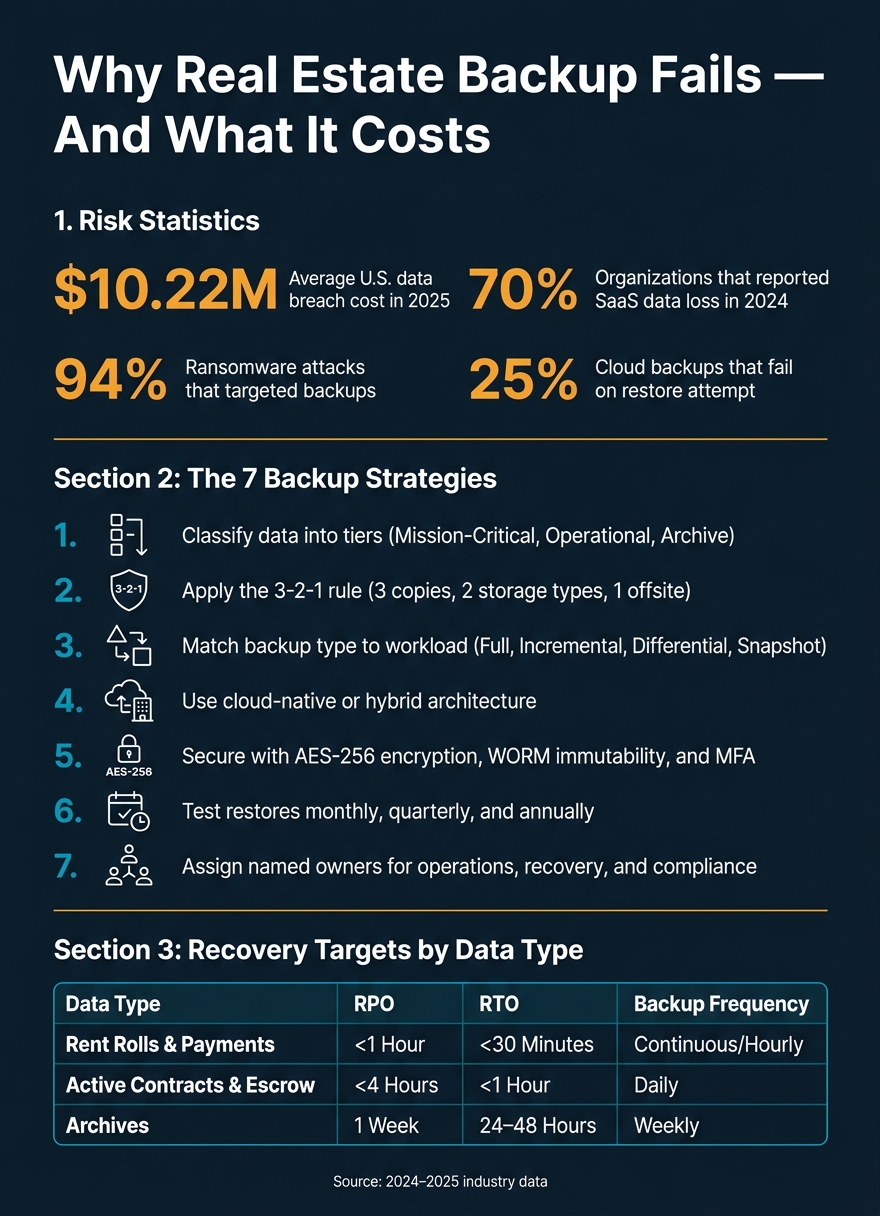
Real Estate Data Backup: Key Stats & Risk Numbers
Quick Comparison
| Strategy | Main Goal | Best Fit | What to watch |
|---|---|---|---|
| 1. Classify data | Set backup priority | Firms with mixed data types | No clear owner |
| 2. Use 3-2-1 copies | Lower loss from outages and device failure | Most real estate teams | No offsite or locked copy |
| 3. Match backup type | Balance storage use and restore time | Teams with different workloads | Slow restores from long chains |
| 4. Choose cloud or hybrid | Fit recovery speed to your setup | SaaS-heavy firms or local server setups | Internet limits and restore fees |
| 5. Secure backups | Stop deletion, theft, and ransomware damage | Any firm storing PII or financial data | Shared credentials and weak access rules |
| 6. Test restores | Prove recovery works | All firms | Backups that look fine but fail on restore |
| 7. Assign ownership | Keep the program active | Small and large teams alike | Backup tasks falling between roles |
If I had to sum it up in one line, it would be this: the right backup plan is not just about storing copies – it’s about getting the right files back, in the right order, within the time your business can survive.
What Real Estate Businesses Need to Protect Before Choosing a Backup Strategy
Before you pick a backup tool or set a schedule, sort your real estate data by how fast you’d need it back and how much loss you can live with.
Real estate teams create data in a lot of places: CRM records and leads, property files, deal documents, accounting records, and old archives. If one of those systems goes down, the damage won’t be the same across the board. Losing rent payment data for even a short stretch can hit day-to-day operations hard. Losing archive files is a different story. That’s where RPO and RTO come in.
Recovery Point Objective (RPO) is the maximum amount of data loss you can tolerate. Recovery Time Objective (RTO) is the maximum amount of downtime you can tolerate. For a property management company that handles rent collection, an RTO might be measured in minutes, not hours.
That’s why backup timing shouldn’t be one-size-fits-all. Different data needs different backup cadences. Use these targets to match backup frequency to each data type:
| Data Type | Recommended RPO | Recommended RTO | Backup Frequency |
|---|---|---|---|
| Rent Rolls and Payments | < 1 Hour | < 30 Minutes | Continuous/Hourly |
| Active Contracts and Escrow | < 4 Hours | < 1 Hour | Daily |
| CRM & Lead Data | 24 Hours | 4 Hours | Daily |
| MLS Listings & Photos | 24 Hours | 4–8 Hours | Daily |
| Archives | 1 Week | 24–48 Hours | Weekly |
You’ll also want to write down your retention, privacy, and audit rules before choosing a platform. Then check what your SaaS vendors cover in their contracts. If you skip that step, it’s easy to let vendor defaults shape your backup plan for you.
Once those requirements are on paper, the next move is to classify your data, enrich property records, and set policies around it.
1. Classify Real Estate Data and Set Backup Policies
Not all real estate data needs the same level of protection. Start by sorting it into tiers based on one simple question: If this data disappeared, how bad would the damage be? Then match each tier to a backup schedule and retention rule.
Use three tiers. Tier 1 (Mission-Critical) covers rent rolls, tenant PII, active escrow documents, and PMS exports. Tier 2 (Operational) includes property listings, maintenance records, vendor invoices, and CRM leads. Tier 3 (Archive) holds closed deals, inspection reports, and marketing drafts – kept 7+ years for audits.
This approach helps tie backup effort to business impact. In plain English: the data that could hurt you most gets the most protection.
Use this framework as a starting point, then adjust it based on workload and compliance needs:
| Data Tier | Examples | Backup Frequency | Retention | Backup Standard |
|---|---|---|---|---|
| Tier 1: Mission-Critical | Rent rolls, Tenant PII, Escrow docs, PMS exports | Hourly / Near-Real-Time | 90 days to 7+ years | 3-2-1-1-0 (Immutable copy required) |
| Tier 2: Operational | Listings, Photos, Maintenance tickets, CRM leads | Daily Incremental | 1–3 years | 3-2-1 (Cloud + Local) |
| Tier 3: Archive | Closed deals, Inspection reports, Marketing drafts | Weekly / Monthly | 7+ years | 3-2-1 (Cold Storage) |
Each tier also needs a clear owner. Without that, backup policy turns into a shared task that no one fully owns.
Assign:
- an Operations Lead for financial and transaction data
- a Tech Lead for listings and system exports
- an Incident Lead for anything tied to tenant PII or compliance
One person should also review backup reports and confirm that copies are stored in the right locations.
That classification sets the stage for the 3-2-1 backups in the next section.
2. Apply the 3-2-1 Rule with Offsite and Cross-Region Copies
Once your data is classified, the 3-2-1 rule gives you a simple framework to protect it. Keep three total copies of your data, across two storage types, with one copy stored in another cloud region or an offsite facility.
For a real estate business, that often looks like this: your live database, a local backup, and a cross-region cloud copy. For Tier 1 data, use the strictest setup. Then decide exactly where each copy should live.
Cloud providers run the platform. But your team still owns backups for exports, lease files, rent rolls, and tenant PII.
For rent collection and property management systems, use near-real-time or hourly backups. During monthly rent-collection windows, aim for restores in minutes. That matters because when payments are coming in, downtime isn’t just annoying. It can stop cash flow.
Use incremental backups to capture frequent changes in listings, rent rolls, and payment records without putting too much strain on the network. Keep photo libraries and marketing assets in cloud object storage for long-term retrieval. A common split is:
- Local SSDs for fast recovery
- Cloud object storage for long-term retention
Once that copy pattern is in place, match the backup method to the workload.
For ransomware defense, use 3-2-1-1-0. Add one immutable or air-gapped copy so ransomware can’t tamper with it. This is a smart fit for rent rolls, tenant PII, and escrow files. Pair that setup with automated restore verification to catch silent backup failures before they turn into recovery failures.
Use this 3-2-1-1-0 version to map each layer to the problem it helps stop:
| 3-2-1 Component | Real Estate Example | Failure Prevented |
|---|---|---|
| 3 Copies | Live CRM data + Local NAS backup + Cloud backup | Device failure |
| 2 Storage Types | Local SSD/NAS + Azure Blob/AWS S3 | Media failure |
| 1 Offsite Copy | Cross-region cloud storage or separate facility | Site outage |
| +1 Immutable | WORM-locked cloud storage | Ransomware |
| +0 Errors | Automated monthly restore verification drills | Silent failure |
3. Match Backup Types to Each Workload
Once your data is classified, the next step is simple: pick the backup type that matches each workload’s speed, size, and restore needs. In plain English, each system should use the backup method that gets it back online as fast as the business needs.
Full backups are the starting point. They copy everything, and they can be restored on their own without depending on other backup files. That makes them a good fit for financial statements, executed leases, and tenant PII. The downside is straightforward: they use more storage.
Incremental backups save only what changed since the last backup run. For MLS listings and image repositories, daily or hourly incrementals can keep storage use down while tightening recovery point objectives. The catch is on restore. You need the full backup plus every incremental in the chain, and long chains can slow things down.
Differential backups save everything that changed since the last full backup. That means recovery needs only the latest full backup and the most recent differential. For teams that want faster restores without dealing with long backup chains, this can be a better fit.
Snapshots are all about speed. For rent collection databases and active MLS platforms, snapshots can keep recovery objectives in the minutes-or-hours range. They rely on pointers and metadata, so restores are near-instant. For rent collection and other live systems, the RTO often needs to be minutes, not hours.
| Backup Type | Best Real Estate Workload | Typical RTO | Storage Efficiency |
|---|---|---|---|
| Full | Weekly baseline; financial/legal records | Slowest | Lowest |
| Incremental | Daily MLS updates; photo/video repositories | Slower | Highest |
| Differential | Financial workloads needing fast recovery | Faster | Moderate |
| Snapshot | Rent collection databases; active MLS platforms | Fastest | High |
Next, build these backup types into a cloud-native or hybrid architecture.
4. Use Cloud-Native and Hybrid Backup Architectures
Pick cloud-native or hybrid based on two things: where your data lives and how fast each workload needs to come back online.
Cloud-native backup is often the right fit for small-to-medium firms that run SaaS tools and cloud-hosted property systems. Hybrid backup combines a local appliance with cloud storage, and it makes more sense when you need sub-hour RTOs for large on-premises datasets. Why? Because local restores run at LAN speeds, not over the public internet. Put simply, the big question is this: does restore speed depend more on your internet connection or your local network?
Cloud providers protect the platform, not your data. They keep the service up, but your team still owns recovery.
Cloud-native tools can use asynchronous replication to keep RPO under 15 minutes and automated failover to restore critical systems in under an hour. Hybrid setups cut restore time for on-premises workloads, with local restores in 15–60 minutes compared with the 2–4 hours that internet-dependent cloud-only recovery usually takes.
No matter which model you choose, both should support immutable storage so ransomware can’t encrypt or delete backup copies. Add AES encryption for data at rest and in transit, MFA on backup admin accounts, and restore verification. Also, keep an eye on egress fees during large restores.
| Feature | Cloud-Native Backup | Hybrid (Appliance + Cloud) |
|---|---|---|
| Best For | SaaS apps, distributed teams | On-prem servers, large local datasets |
| Recovery Time (RTO) | 2–4 hours (internet-dependent) | 15–60 minutes (local network speed) |
| Monthly Cost Range | $50–$200 | $150–$400 |
| Internet Dependency | High | Low (can restore locally during outages) |
| Scalability | Instant, near-infinite | Limited by local hardware capacity |
5. Secure Backups with Encryption, Immutability, and Access Controls
Once your backup setup is in place, the next job is control: who can read, change, or delete those copies. Offsite backups help, but they also need to be locked down with encryption, immutability, and separate access paths. That matters more than ever. In 2025, 94% of ransomware attacks tried to hit backups, and 57% succeeded. So backup security isn’t a side issue. It’s part of the backup plan itself.
For encryption, use AES-256 for data at rest and TLS 1.2+ for data in transit. Use customer-managed encryption keys (CMKs), and keep backup keys in a separate KMS or vault account. Production systems should be able to write encrypted backups, but decryption access should stay limited to the DR team. Rotate keys every 12 months, and keep older key versions for the full backup retention period. If you toss old keys too soon, old backups can turn into sealed boxes you can’t open when you need them most.
Immutability is the next line of defense. Use WORM-backed immutable storage so backups can’t be changed or deleted after they’re written. If you’re using cloud object locks like AWS S3 Object Lock, choose Compliance Mode instead of Governance Mode. That distinction matters. Governance Mode can be bypassed by privileged accounts. Compliance Mode cannot be shortened or deleted by anyone, including root accounts, during the retention period. For operational backups, use 30–90 day locks. For regulatory archives that cover tenant PII, escrow files, and rent rolls, longer compliance-mode locks – up to 7 years – make sense.
Access control needs the same level of care. Require MFA and RBAC on every backup console. Keep backup credentials separate from production and Active Directory. No single admin account should have access to both production data and backups. That kind of split may feel like extra work, but it’s what stops one compromised account from taking down everything at once. If you use Azure’s Multi-User Authorization (MUA), require a second approval for backup-policy changes.
Even with locked storage and tight access, backups still fail if restores don’t work. That’s why restore testing comes next.
The table below ties security controls to retention rules for the data classes defined earlier, so backup copies stay usable when recovery time matters most:
| Framework | Minimum Retention | Key Security Requirement |
|---|---|---|
| HIPAA | 6 Years | BAA with provider; PHI encryption |
| PCI DSS | 1 Year | Encrypted storage required |
| SOX | 7 Years | Immutable storage recommended |
| GDPR | Varies | Right to erasure compliance |
With backups locked down, the next step is proving they restore cleanly.
6. Test Restores Regularly and Run Disaster Recovery Drills
Backups can look fine on paper and still fail when you need them most. That’s the problem. 25% of cloud backups fail when a business actually attempts to restore from them. So the answer isn’t “back up more.” It’s test restores on a schedule.
Start with a simple tiered routine. Run monthly file-level restores by choosing three random files from different dates and making sure they open cleanly. Every quarter, restore your most important application data – such as a Yardi or MLS database or a property management system export – to an isolated test environment, then confirm the application runs. Once a year, run a full site-failure drill: assume the primary office is gone, recover from offsite or cloud copies, and compare actual recovery time against your RTO and restored-data age against your RPO. That turns backup policy into something you can measure instead of something you just hope will work.
A restore test is the only proof that a backup works.
During every restore test, use SHA-256 checksum verification to catch file corruption that file names won’t show. Automated scripts that compare data hashes, along with heartbeat monitoring, should flag failed or incomplete backup jobs right away. Manual spot-checks of random files add one more check, which matters more than people think.
The table below links data tiers to practical RTO and RPO targets, so each test has a clear pass/fail line:
| Data Tier | Example Data | RPO Target | RTO Target |
|---|---|---|---|
| Tier 1 | Production DBs, rent rolls, financials | 15–60 mins | 1–2 hours |
| Tier 2 | Tenant PII, leases, application data | 1–4 hours | 4 hours |
| Tier 3 | Archives, cold storage, old listings | 24 hours | 8–24 hours |
Source: Compiled from
Each drill should end with a written postmortem. Note what failed, how long recovery took versus the target, and what needs to change. Use the assigned incident and tech owners to run each drill, and keep a recovery runbook with recovery steps, vendor contacts, key locations, and system-priority order so any trained staff member can handle recovery if needed. Then use drill results to track restore success, recovery time, and failure rates.
7. Assign Ownership, Train Staff, and Review Backup Programs Over Time
Once the backup design is set, the next step is simple: put people in charge, train the team, and review the program on a set schedule.
A backup program with no named owner tends to fail quietly. And in most cases, vendor terms put backup responsibility on the customer.
Ownership should sit with specific people, not vague team names. Give one person responsibility for backup operations, one for recovery targets, and one for compliance. If you’re running a smaller firm, that role often falls to a vCIO or MSP. Role-based checklists help here because each backup task has one clear owner.
Those owners also need to train the people who will report issues, approve actions, or carry out recovery steps. Office staff should know how to report accidental deletions, spot phishing attempts, and follow contact rules during an incident. Brokers and firm owners should understand what RPO and RTO mean in practice: how much data you can lose, how long systems may be down, and what that means during rent collection or closings when downtime hits revenue fast. A good way to keep this practical is with quarterly tabletop sessions built around the recovery runbook.
Reviews are what keep the program from going stale. Daily automated monitoring can catch silent failures. Weekly report checks confirm that critical files are still being backed up. Quarterly restore tests show whether databases and key real estate software still work after restoration. Annual full DR drills show how your actual recovery time compares with the RTO you stated on paper. On top of that, a periodic policy review helps keep the backup program lined up with business growth and current rules such as CCPA and NAR data retention policies.
| Review Component | Frequency | Owner |
|---|---|---|
| Job Monitoring | Daily | Tech Lead / MSP |
| Restore Testing | Quarterly | Tech Lead & Ops Lead |
| Security Controls | Monthly | Tech Lead / vCIO |
| Compliance Review | Annual / Bi-Annual | Compliance Officer |
| Full DR Drill | Annual | All Leads |
Log every drill outcome with timestamps. Then update the recovery runbook after each review cycle. Those review cycles feed the monitoring metrics in the next section.
Metrics and Monitoring That Keep Backup Programs Reliable
Once ownership and review cycles are in place, these KPIs show if the program is hitting its recovery goals. The point is simple: prove the backup program works in practice, not just that jobs are running.
The main KPIs to review each month are backup success rate, restore success rate, average recovery time (RTO), actual RPO, backup window duration, and storage growth rate.
Backup success rate should be 100% after automated verification. But that number alone doesn’t tell the whole story. Restore success rate is the hard proof, because a backup only matters if it restores cleanly. For property management systems that handle rent collection, RTO should be measured in minutes, not hours. And actual RPO for payment records should stay under 1 hour so critical transaction data doesn’t disappear.
Use the table below as the monthly scorecard:
| Metric | Real Estate Target | Risk if Missed |
|---|---|---|
| Backup Success Rate | 100% (daily verification) | Silent data gaps; false sense of security |
| Restore Success Rate | 100% (monthly/quarterly drills) | Recovery failure during an incident |
| RTO | Minutes for rent collection; under 4 hours for critical systems | Stalled rent collection, missed closing deadlines |
| Actual RPO | Under 1 hour for payment records | Loss of escrow records, signed contracts, or tenant PII |
| Backup Window Duration | Off-peak hours; keep windows short with incremental or synthetic full backups | System latency during property searches or showings |
| Storage Growth Rate | Real-time AI alerts for sudden spikes in file changes | Backups fail silently when storage is overfilled |
| Cost per GB | ~$0.10–$0.15/month | Budget overruns from unmanaged storage growth |
Treat failed jobs and missed restores as alerts, not as something to write up later in a postmortem. Failed backup jobs, storage nearing capacity, unauthorized access attempts, and backup policy drift should trigger immediate notifications.
Backup policy drift happens when new property listings, tenant PII, or CAM reconciliation files are created but never added to the backup schedule. That gap can sit there quietly until a restore is needed. Storage growth alerts matter for another reason too: sudden spikes in file changes can point to ransomware activity.
It also helps to watch the money side, not just the uptime side. Review cloud egress fees each month to avoid restore-cost surprises. Track retention-window expiration as a compliance alert.
Use these metrics to compare backup approaches side by side.
Backup Comparison Tables
The tables below turn the seven strategies into fast selection rules.
Table 1: Backup Copy Location Comparison
Local, offsite, and cross-region copies support different recovery targets. This lines up directly with the 3-2-1 model.
Use this table to match copy location with restore speed and outage risk.
| Copy Type | Purpose | Pros | Cons | RTO / RPO |
|---|---|---|---|---|
| Local (NAS/Disk) | Rapid recovery from deleted files or minor errors | Fastest restore speed; no internet needed | Vulnerable to fire, flood, theft, and local ransomware | RTO: Minutes / RPO: 15–60 mins |
| Offsite (Cloud) | Disaster recovery and offsite protection | Geographically separate; scalable storage | Restore speed limited by bandwidth; egress costs apply | RTO: 4+ hours / RPO: 12–24 hours |
| Cross-Region | Protection against regional outages | Highest resilience for multi-site portfolios | Most expensive; most complex to manage | RTO: 4–8 hours / RPO: 24 hours |
Table 2: Backup Method Comparison
Your backup method should track with workload change rate and restore needs. Put simply, a busy MLS feed and a quiet archive don’t need the same setup.
Use this table to match backup type with change rate and restore speed.
| Backup Type | Real Estate Use Case | Restore Speed | Storage Impact |
|---|---|---|---|
| Full | Weekly baseline for all property records | Fastest (single set) | High – copies everything each time |
| Incremental | Daily or hourly updates to MLS listings and CRM notes | Slow to restore; requires the full backup plus each incremental in sequence | Lowest – captures only changes |
| Differential | Mid-week protection for transaction and audit files | Moderate – requires full backup plus one differential | Moderate – grows between full backup cycles |
| Snapshot | Property photo libraries, GIS volumes, and databases (Yardi/MRI) | Near-instant – point-in-time copy | Low to moderate – depends on change rate |
Table 3: Security Controls and the Risks They Reduce
Security controls should match the failure you’re trying to stop. One control may help with data theft, while another is there to stop deletion or tampering.
Use this table to match each control with the risk it reduces.
| Security Control | Primary Risk Reduced | Secondary Benefit |
|---|---|---|
| Encryption (AES-256) | Data breach; tenant PII exposure during transit and at rest | Compliance with state-level privacy laws |
| Immutability (WORM) | Ransomware encryption; malicious deletion by hackers or rogue staff | Protection against unauthorized admin changes |
| Retention Locks | Accidental deletion; premature deletion of legal or tax records | Legal and audit compliance for lease and financial files |
| Audit Logging | Insider threats; credential abuse; unauthorized access | Faster incident response and forensic investigation |
Conclusion
A solid real estate backup program is more than a tool or a one-time setup. These seven strategies work best as one system, not seven separate tasks. Together, they cover classification, redundancy, security, restore testing, and clear ownership.
Start with mission-critical property records, then expand coverage to lower-priority data. The seven strategies above create one complete recovery framework. Apply them in order, assign one owner, and test restores before an outage forces the issue.
FAQs
How do I set the right RPO and RTO for my real estate data?
Set the right RPO and RTO by grouping systems based on how much they affect day-to-day business. RPO is the most data you can afford to lose, measured in time. That target shapes how often you need backups. RTO is the most downtime you can accept before operations need to be back up and running.
For mission-critical data, like rent payments or active contract records, aim for sub-hour RPOs and RTOs. For less critical data, such as non-essential document archives, longer targets usually make more sense.
Should my real estate business use cloud-only or hybrid backups?
A hybrid backup strategy is usually the better pick. It gives you a better mix of speed, cost, and security than cloud-only backups. Cloud-only setups do offer offsite protection, but they may not restore data fast enough when transactions are live or traffic is heavy.
With hybrid backups, you keep data on-site for fast recovery and copy it to the cloud for disaster protection. That setup also supports the 3-2-1 backup rule.
How often should I test backup restores?
Test restores on a regular basis to make sure you can actually get your data back.
A backup that looks fine on paper can still fail when it matters most. Files may be corrupted, apps may not start, or permissions may block access at the worst possible time.
Run a mix of restore tests, including:
- File-level restores to check that individual files open and work as expected
- System-level restores to confirm whole machines or systems can come back online
- Recovery scenarios to spot configuration mistakes, permission problems, and gaps in your documentation before an emergency hits
That kind of testing helps you find weak spots early, when the stakes are low and fixes are still simple.